
What this tool does
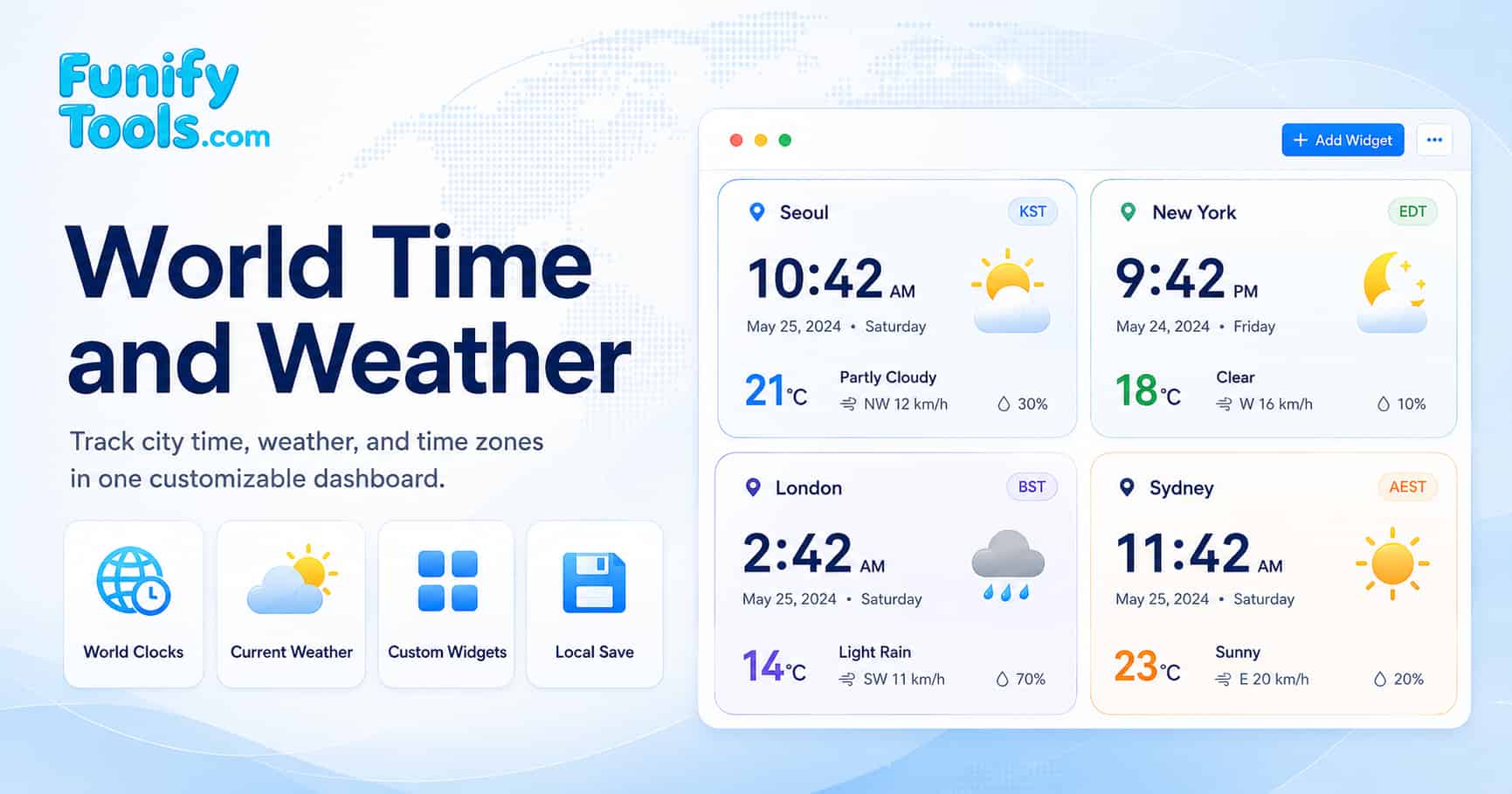
Use this dashboard when you need to plan a call, handoff, class, stream, customer support window, or travel check across several cities. Each city card combines the current local time, current weather, temperature, wind, precipitation, and local working-hour range in one place.
The page is built for practical comparison rather than manual time-zone math. Add the cities you care about, scan their clocks and weather side by side, then use the Best Meeting Time panel to find hours where the selected cities overlap.
Unlike a basic world clock, this page combines live city time, current weather, local working hours, custom city coordinates, favorite groups, and meeting overlap suggestions in one browser dashboard.
Common ways to use this time zone meeting planner
- Plan a meeting between Korea, the United States, and Europe.
- Check whether a city is inside local working hours before calling.
- Compare time and weather before a business trip or live event.
- Save repeated city groups for remote teams, clients, or travel routes.
Example: Seoul, New York, London, and Sydney
Suppose a team has people in Seoul, New York, London, and Sydney. Seoul and Sydney are relatively close in working-day order, London often works as a bridge between Asia Pacific and North America, and New York can shift by one hour relative to London during daylight saving transitions.
With all four cities on the dashboard, you can see whether an evening Korea call is still a morning US call, whether London is inside working hours, and whether weather conditions are relevant before scheduling travel, field work, or a live event.
How to compare city time and weather
Start by adding each city you need to compare. The cards update their local clocks automatically and request current weather from Open Meteo using each city's coordinates. This avoids switching between separate world clock and weather websites while you are planning.
Use color settings or card order to group related regions. For example, you can place Asia Pacific cities first, European cities second, and North American cities last, or use different card colors for teams, clients, and travel stops.
How to find a meeting time across time zones
The Best Meeting Time panel checks the selected cards over a rolling 24-hour period and highlights windows where the most cities are inside their local working hours. The suggestions are displayed in your browser's local time so you can quickly choose a meeting slot.
If a city has a different schedule, open the working-hours settings and adjust that city's start and end time. This is useful for night-shift teams, regional holidays, support coverage, or offices that do not follow a standard 9-to-5 schedule.
How favorites and custom cities work
Click the star on a city card to save that city as a favorite. Favorites are useful when you repeatedly compare the same offices, customers, travel destinations, or partner cities. Groups let you keep separate dashboards for different projects or regions.
If a city, island, station, or other location does not appear in the suggestion list, type at least two characters and choose Enter manually. Enter a location name, optional country or region, latitude, and longitude. The tool verifies the coordinates, detects the IANA time zone, and checks current weather before creating the card.
Notes about weather accuracy and daylight saving time
When you compare cities such as Seoul, London, and New York, daylight saving time can shift the overlap by one hour depending on the season. This tool uses timezone data through Moment Timezone to show each city's current local time, so you do not have to manually calculate the difference.
Weather values are requested from Open Meteo by latitude and longitude. They are helpful for quick planning, but they should be treated as reference data. For safety-critical decisions, severe weather, aviation, marine activity, or emergency planning, use official local weather services and alerts.
The reference sections below explain UTC offsets, time zone data, weather codes, and wind units when you want to understand a displayed value in more detail.
Reference: UTC and time offsets
Coordinated Universal Time (UTC) is the internationally coordinated time scale used as the basis for civil timekeeping. It is produced by the International Bureau of Weights and Measures (BIPM), is based on International Atomic Time (TAI), and is adjusted when needed so it stays close to Earth's rotation. National realizations such as UTC(NIST) are kept closely aligned with UTC for official time distribution.
Time offsets are expressed as UTC±HH:MM. For example, Japan Standard Time is UTC+09:00, meaning it is nine hours ahead of UTC. Newfoundland Standard Time is UTC−03:30, while some regions use unusual offsets such as UTC+08:45. These offsets are often based on longitude but are ultimately decided by national or regional laws.
The following table shows how UTC offsets correspond to longitude ranges, illustrating the theoretical basis for time zone boundaries:
| UTC offset | Longitude range (theoretical) | Example regions |
|---|---|---|
| UTC−12:00 | Near the 180° meridian | Baker Island, Howland Island (uninhabited US territories) |
| UTC−08:00 | 127.5°W - 112.5°W | Los Angeles, Vancouver, Tijuana (Pacific Time) |
| UTC−05:00 | 82.5°W - 67.5°W | New York, Toronto, Havana (Eastern Time) |
| UTC±00:00 | 7.5°W - 7.5°E | London, Dublin, Accra, Reykjavik |
| UTC+05:30 | 75°E - 90°E (India uses a single offset) | India, Sri Lanka |
| UTC+09:00 | 127.5°E - 142.5°E | Seoul, Tokyo, Pyongyang, Yakutsk |
| UTC+12:00 | Near the 180° meridian | Auckland, Fiji, Kamchatka |
Reference: daylight saving time
Daylight Saving Time (DST) is the practice of advancing clocks during part of the year. It matters for meeting planning because a city's offset can change even when the city name stays the same. For example, New York and London do not always shift on the same date, so their time difference can temporarily change.
DST observance is highly region-specific. Some countries use it, some do not, and the start and end dates may change by law. That is why a practical world time tool should rely on timezone rules instead of a fixed manual offset.
The IANA Time Zone Database, which powers the Moment Timezone library used in this tool, tracks all historical and current DST transitions for every time zone. This ensures that the displayed local time is always accurate, even when a region changes its DST policy. For example, when the United States changed its DST start date from April to March in 2007, the IANA database was updated accordingly, and applications using the database automatically reflected the change.
Reference: coordinates and weather lookup
Weather conditions are fundamentally influenced by a location's latitude and longitude. Latitude determines the amount of solar radiation a location receives, which directly affects temperature and climate patterns. According to the NOAA National Weather Service JetStream guide to global climate, regions near the equator (low latitudes) receive more direct sunlight year-round, resulting in warmer temperatures and distinct wet and dry seasons. Higher latitudes receive sunlight at a more oblique angle, leading to cooler temperatures and more pronounced seasonal variations.
Longitude helps identify a location and its local solar time, while latitude has a more direct influence on climate through solar angle and day length. Atmospheric circulation is shaped by many factors, including latitude, Earth's rotation, land and ocean patterns, altitude, and regional pressure systems.
This tool uses the selected city's location coordinates to request current weather data from the Open Meteo API. When you add a city, its coordinates are used for the weather lookup, and the returned values are shown on the city card. Weather accuracy may vary by location and by the data returned from the weather provider.
Reference: adding an unlisted location manually
When a city, island, station, or other location does not appear in the suggestion list, enter at least two characters in the city search and choose Enter manually at the bottom. The manual form accepts a location name, optional country or region, latitude from -90 to 90, and longitude from -180 to 180.
Before creating the card, the tool sends the coordinates to Open Meteo to confirm that current weather is available and to detect an IANA time zone automatically. The detected time zone is checked against Moment Timezone so the local clock, UTC offset, weather condition, temperature, wind, and precipitation can be displayed immediately. If verification fails, no card is created and the form shows an error.
Manual cards are saved in the active group like regular city cards. Their coordinates are included in duplicate and favorite identification, which allows similarly named locations in the same time zone to remain distinct.
Reference: Open Meteo weather API
The Open Meteo API is a free, open-source weather forecast service that provides high-resolution weather data without requiring an API key. According to the official Open Meteo documentation, the API uses data from national weather services including the European Centre for Medium-Range Weather Forecasts (ECMWF), the National Weather Service's Global Forecast System (GFS), and the German Weather Service (DWD).
For this dashboard, the main benefit is that current weather can be requested directly by city coordinates without asking the user to enter a separate weather station or location code.
- No API key required - The page can request current weather values directly from the browser.
- Coordinate-based lookup - The selected city's latitude and longitude are used for the weather request.
- Useful current values - The card can show temperature, wind, precipitation, and a simple weather status.
In this tool, the Open Meteo API is called with the selected city's latitude and longitude. The request asks Open Meteo to return current temperature, wind speed, weather code, and precipitation in Fahrenheit, mph, and inches, so the displayed values already match the units shown on the card.
Reference: Moment Timezone library
Moment Timezone is a JavaScript library that extends Moment.js with time zone support. In this dashboard, it turns each selected city's timezone value into a local clock and helps the meeting time calculator compare working-hour windows across cities.
In this tool, Moment Timezone performs the following functions:
- Retrieves the current time in the selected city's time zone using
moment().tz(timezone). - Formats the time as a 24-hour string (HH:mm) for display on each city widget.
- Updates all displayed times every 3 seconds to ensure the dashboard shows accurate, up-to-date local times.
The IANA Time Zone Database is hosted by IANA and maintained through the tz database project. It is updated when governments change time zone laws, daylight saving schedules, or regional boundaries, allowing libraries such as Moment Timezone to handle historical and current time transitions accurately.
City time zone reference
The following table lists major world cities, their time zones, and standard UTC offsets. Use it as a quick reference, but rely on the live cards and meeting time calculator when DST or local working hours may affect the final meeting choice.
| City | Country | IANA time zone | Standard UTC offset | Observes DST |
|---|---|---|---|---|
| New York City | United States | America/New_York | UTC−05:00 | Yes |
| London | United Kingdom | Europe/London | UTC±00:00 | Yes |
| Paris | France | Europe/Paris | UTC+01:00 | Yes |
| Tokyo | Japan | Asia/Tokyo | UTC+09:00 | No |
| Seoul | South Korea | Asia/Seoul | UTC+09:00 | No |
| Dubai | United Arab Emirates | Asia/Dubai | UTC+04:00 | No |
| Sydney | Australia | Australia/Sydney | UTC+10:00 | Yes |
| Mumbai | India | Asia/Kolkata | UTC+05:30 | No |
| São Paulo | Brazil | America/Sao_Paulo | UTC−03:00 | No (historically observed) |
| Los Angeles | United States | America/Los_Angeles | UTC−08:00 | Yes |
Weather code reference
The Open Meteo API returns weather condition codes (WMO weather interpretation codes) that describe the current weather state. The following table maps each code to its corresponding weather description, as defined by the World Meteorological Organization (WMO) code table 4677.
| Code | Weather description | Displayed status in this tool |
|---|---|---|
| 0 | Clear sky | Clear |
| 1, 2 | Mainly clear, partly cloudy | Partly Cloudy |
| 3 | Overcast | Cloudy |
| 45, 48 | Foggy, depositing rime fog | Foggy |
| 51, 53, 55 | Drizzle: light, moderate, dense | Drizzle |
| 61, 63 | Rain: slight, moderate | Rainy |
| 65 | Rain: heavy | Rainy |
| 71, 73 | Snow: slight, moderate | Snowy |
| 75 | Snow: heavy | Snowy |
| 80, 81, 82 | Rain showers: slight, moderate, violent | Rainy |
| 85, 86 | Snow showers: slight, heavy | Snowy |
| 95 | Thunderstorm: slight or moderate | Thunderstorm |
| 96, 99 | Thunderstorm with hail: slight, heavy | Thunderstorm |
Wind speed reference
This tool requests wind speed from the Open Meteo API in miles per hour (mph). The following table shows common wind speed values and their equivalents across km/h, mph, m/s, and the Beaufort scale, which is useful when comparing weather data from different sources.
| km/h | mph | m/s | Beaufort scale | Description |
|---|---|---|---|---|
| 0 - 5 | 0 - 3 | 0 - 1.4 | 0 - 1 | Calm / Light air |
| 6 - 11 | 4 - 7 | 1.5 - 3.1 | 2 | Light breeze |
| 12 - 19 | 8 - 12 | 3.2 - 5.3 | 3 | Gentle breeze |
| 20 - 28 | 13 - 17 | 5.4 - 7.8 | 4 | Moderate breeze |
| 29 - 38 | 18 - 24 | 7.9 - 10.6 | 5 | Fresh breeze |
| 39 - 49 | 25 - 30 | 10.7 - 13.6 | 6 | Strong breeze |
| 50 - 61 | 31 - 38 | 13.7 - 16.9 | 7 | Near gale |
| 62 - 74 | 39 - 46 | 17.0 - 20.6 | 8 | Gale |
| 75 - 88 | 47 - 54 | 20.7 - 24.4 | 9 | Strong gale |
| 89 - 102 | 55 - 63 | 24.5 - 28.3 | 10 | Storm |
| 103 - 117 | 64 - 72 | 28.4 - 32.5 | 11 | Violent storm |
| ≥ 118 | ≥ 73 | ≥ 32.6 | 12 | Hurricane |
External references
For further reading on time zones, weather data, and the libraries used by this dashboard, see these useful references:
- Time and Date - Time Zone Reference - A comprehensive guide to time zones, UTC offsets, and Daylight Saving Time around the world.
- NIST Time and Frequency Division - The official U.S. authority on time measurement, atomic clocks, and UTC dissemination.
- Open Meteo - Weather forecast API used by the dashboard for current temperature, wind, precipitation, and weather codes.
- Moment Timezone - JavaScript time zone library used to display each selected city's local time.