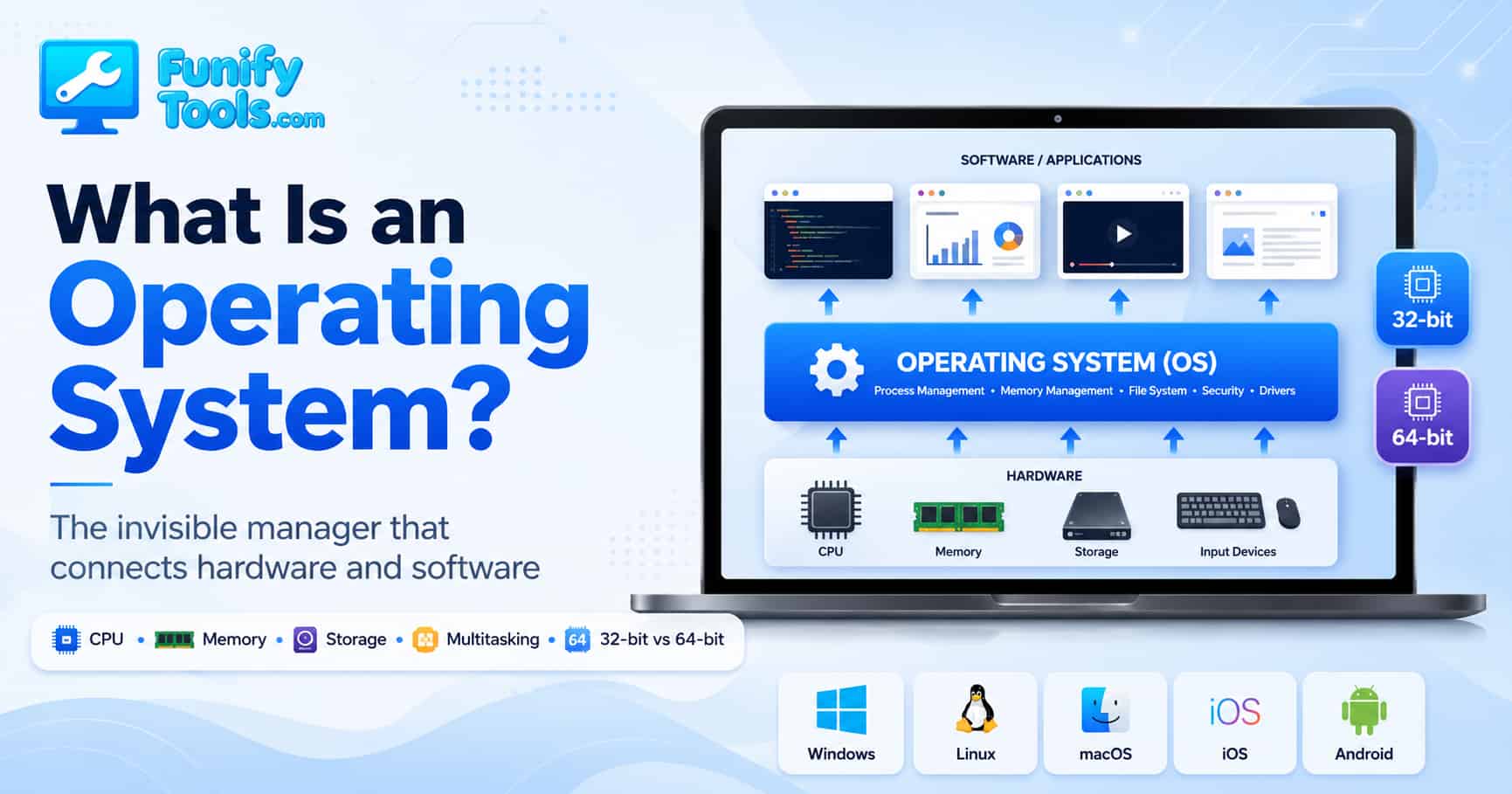
An operating system (OS) is the core system that connects a computer’s hardware and software, efficiently managing resources such as the CPU, memory, and storage.
It provides users with both console and GUI environments, allowing anyone to easily communicate with the computer, while also supporting multitasking so multiple programs can run at the same time.
There are various kinds of operating systems, including Windows, Linux, macOS, iOS, and Android. Each has its own characteristics, advantages, and disadvantages, and is used in both PC and mobile environments depending on those traits.
Hello.
In the previous series, we looked at the physical structure of computers. We talked about parts such as the CPU, memory, storage, and motherboard. This time, we will move from the visible hardware to something less visible but just as important: the operating system.
When you turn on a computer, the very first thing that prepares the machine for use is the operating system. Although it is mostly invisible while we use the device, it acts like an unseen manager that allows us to freely use the computer. Even simple actions such as clicking an icon with the mouse or typing a letter on the keyboard would be impossible without the OS.
For example, when you press “A” on the keyboard, the electrical signal is sent through the hardware, interpreted by the system, transformed into a character code, and displayed as the letter “A” on the monitor. To us, this feels instant and ordinary. But behind that one small action, the operating system is coordinating input, memory, CPU processing, and output.
That is why the OS is sometimes hard to appreciate. When it works well, we barely notice it. But the moment it fails, freezes, crashes, or cannot find a device, we suddenly realize how much it was doing in the background.
To understand the role of the OS, we must first recall the difference between hardware and software.
Hardware refers to the computer’s physical parts that you can see and touch, such as the CPU, memory, and graphics card, as explained in previous articles. Software, on the other hand, is not physical but consists of the programs running on the hardware—for instance, games, web browsers, and document editors.
The operating system acts as a bridge between the two, providing a standardized environment so users and applications do not have to deal with hardware directly.
Without an OS, a user would have to send commands directly to the hardware. For example, to save a file, one would need to know the detailed instructions for the storage device, and to display text on the screen, one would have to understand exactly how the graphics card functions. With the OS handling these complex processes in the background, the user only needs to run a program and click a button. The OS allocates and manages the CPU, memory, storage, and input/output devices so that resources are used efficiently.
This bridge role is also helpful for software developers. A web browser or game does not need to know the exact model of every keyboard, SSD, speaker, or graphics card in the world. The program talks to the operating system, and the OS talks to the hardware through drivers and system services. This makes software much easier to build and much easier to use across many different machines.
In other words, the OS hides a lot of hardware complexity. That hiding is not a weakness. It is one of its greatest strengths. It lets ordinary users and programs work with simple concepts such as files, windows, folders, buttons, permissions, and apps instead of raw electrical signals.
The OS also provides the interface that lets users interact with computers.
In the past, text-based consoles required users to type commands manually. Today, graphical user interfaces (GUIs) with icons and windows are widely used. The Windows taskbar, macOS Dock, Android home screen, and the touchscreens of smartphones are examples of user-friendly interfaces developed by operating systems. Thanks to this, even those who don’t know complex commands can easily use computers.
Of course, the command line has not disappeared. Developers, system administrators, and power users still use terminals because they are fast, precise, and powerful. But for most everyday users, the GUI is what makes the computer approachable. Opening a folder, dragging a file, changing settings, or installing an app all become visual actions.
This is one reason the design of an operating system matters. The same hardware can feel simple or confusing depending on how the OS presents it. A good interface reduces friction. It makes the computer feel less like a machine and more like a tool you can naturally control.
Multitasking is another important feature.
In reality, a CPU core can only work on a limited number of instructions at a time. But the OS divides CPU time into very small slices and allocates them to multiple programs in turn, making it appear as if they are running simultaneously. Watching a video in a browser, listening to music, and editing a document at the same time is possible because the OS uses time-sharing to distribute resources effectively.
The operating system also decides which tasks should receive priority. If a video call is active, it may need steady access to the microphone, camera, network, and CPU. If a background app is updating quietly, it may be given fewer resources. This kind of scheduling happens constantly, and most of the time we do not notice it.
Multitasking is not only about convenience. It is also about stability. A good OS tries to prevent one program from taking everything for itself. If one app freezes, the entire computer should not always freeze with it. That separation between programs is one of the reasons modern operating systems feel much safer and more reliable than older systems.
There is also the concept of 32-bit and 64-bit operating systems.
Here, “bit” refers to the size of data that can be processed or addressed in a certain way by the CPU and operating system. A 32-bit OS allows the system to work within 32-bit limits and can usually recognize up to about 4GB of memory. Even if 8GB or 16GB of RAM is installed, only part of it can actually be used.
A 64-bit OS, however, can handle a much larger memory address space, which allows it to use far more RAM. Beyond just larger memory capacity, 64-bit systems also provide better efficiency and stronger security features. For example, 64-bit programs can process larger data units in a single calculation, and security technologies such as ASLR are more robust.
For everyday users, the easiest way to understand the difference is this: 64-bit systems are better suited for modern software, larger memory, and heavier workloads. If you edit videos, play modern games, run virtual machines, use many browser tabs, or work with large files, a 64-bit system is basically expected.
Most modern operating systems are based on 64-bit architecture, while 32-bit systems are now mostly found on older hardware or embedded devices. For new computers and installations, 64-bit has effectively become the standard.
Looking at the history of operating systems: Unix emerged in the 1960s and became the foundation of modern OS design. In the 1980s, MS-DOS and Windows advanced, opening the era of personal computers. The 1990s saw the rise of Linux and the spread of the open-source movement. Since the 2000s, iOS and Android have driven the mobile OS era. In this development process, large companies like Microsoft, Apple, and Google, as well as open-source communities, have all played major roles.
This history is interesting because operating systems changed together with the way people used computers. When computers were mostly used by specialists, command-line systems were enough. As personal computers entered homes and offices, graphical interfaces became more important. When smartphones became common, touch-based mobile operating systems became the center of daily digital life.
Each operating system grew around a different priority. Windows became strongly associated with broad hardware compatibility and office use. macOS became known for its polished desktop experience and Apple ecosystem. Linux became powerful in servers, development, and open-source environments. iOS and Android focused on mobile devices, touch interaction, app stores, battery efficiency, and security.
Today, virtualization is also an important concept. Virtualization means running multiple operating systems simultaneously on a single physical computer. For example, you can run Linux in a virtual machine inside Windows. (This will be covered in detail in another article later.)
Virtualization is useful because it lets one machine behave like several machines. Developers can test software in different environments. Companies can run many server systems on fewer physical computers. Students can experiment with Linux without erasing Windows. It is one of the technologies that makes modern cloud computing possible.
Even at the moment you click a program icon, the OS is at work. It loads the program into memory, instructs the CPU to perform calculations, reads necessary data from storage, and sends the results to the monitor and speakers. In other words, the OS is responsible for the entire process of program execution.
Let’s slow that down for a moment. When you open a browser, the OS finds the browser program on storage, loads the necessary parts into RAM, gives it CPU time, allows it to use the network, draws its window on the screen, and manages its input from the keyboard and mouse. If the browser needs to save a downloaded file, the OS also handles the file system and storage access.
At the same time, the OS must protect programs from one another. A music player should not randomly overwrite the memory used by your document editor. A website should not freely access every file on your drive. A normal app should not be able to control the entire system without permission. This is why operating systems also manage security, user accounts, permissions, and process isolation.
Updates are another part of the OS story. Operating systems are not finished once installed. They receive security patches, driver updates, feature improvements, and bug fixes. Sometimes updates feel inconvenient, but they exist because the OS is responsible for keeping the whole system usable and safer over time.
For those who want to study operating systems more deeply, recommended textbooks include Operating System Concepts (often called the “Dinosaur Book”) and Andrew S. Tanenbaum’s Modern Operating Systems. These are widely used in universities and help build a systematic understanding of OS principles.
Those books go much deeper into topics such as processes, threads, memory management, file systems, scheduling, synchronization, deadlocks, and security. You do not need to master all of that at the beginning, but even knowing that these areas exist can make computers feel less magical and more understandable.
In the end, the operating system is the invisible manager and resource allocator of the computer. Whether we are playing games, writing documents, or browsing the web, the OS is constantly working in the background to make everything possible. Understanding its existence and principles is the first step toward a deeper understanding of IT.
If hardware is the body of the computer, the operating system is the system that coordinates the body’s movements. It decides how resources are shared, how programs start and stop, how files are organized, how devices communicate, and how users interact with the machine.
That is why learning about operating systems is useful even if you are not planning to become a system engineer. It helps you understand why a computer slows down, why updates matter, why memory usage changes, why permissions exist, why different devices feel different, and why the same app can behave differently on Windows, macOS, Linux, iOS, or Android.
That concludes this overview of operating systems. In the next article, we will examine the specific characteristics of Windows, Linux, macOS, iOS, and Android in more detail.
Thank you for reading, and have a great day!
This article is also available in Korean: Read the Korean version