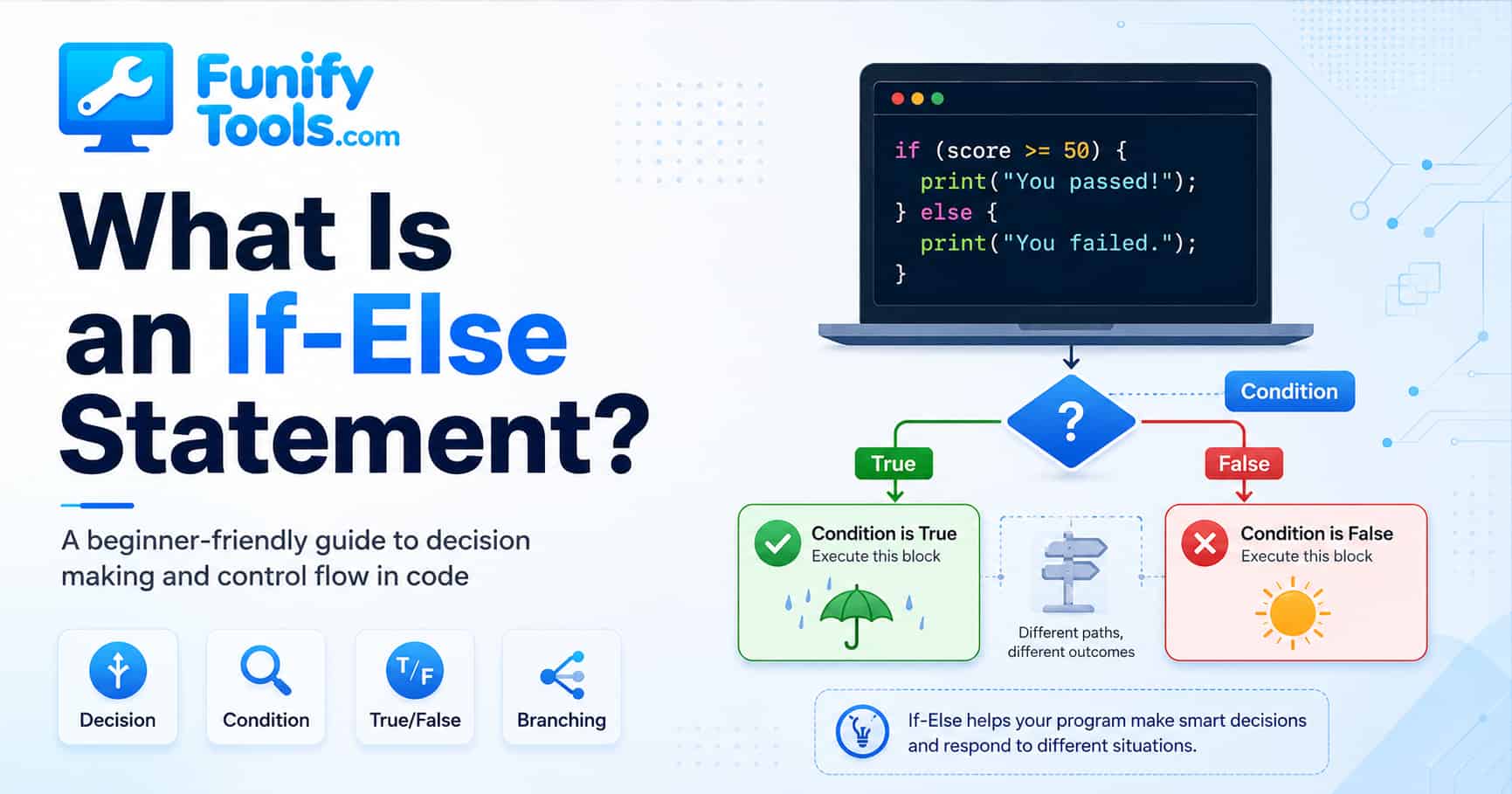
A Beginner-Friendly Guide to Decision Making and Control Flow in Code
When people first start learning programming, they quickly run into a few core ideas: variables, functions, loops, and conditionals. Among them, the conditional statement is one of the most important because it teaches a program how to make decisions.
A conditional statement is how we tell a computer, “If this happens, do this. Otherwise, do something else.” It sounds simple, but this simple structure is behind an enormous amount of software behavior.
If loops are about repetition, conditionals are about choice. A loop tells the computer to repeat the same action over and over. A conditional tells the computer to check a situation and respond differently depending on what it finds. That ability to branch into different paths is one of the foundations of programming.
In other words, conditionals are what make code feel smart. Not smart in the human sense, of course, but smart enough to react instead of blindly doing the same thing every time.
People make decisions naturally all day long without even thinking about it. If it is raining, we grab an umbrella. If we are hungry, we eat. If the traffic light is red, we stop. Humans do this automatically. Computers do not. A computer will never “just know” what to do unless we explain the rule clearly in code.
That is exactly what an if-else statement does. It gives the computer a rule to evaluate and tells it what action to take depending on whether the rule is true or false.
At its core, a conditional statement works like this:
First, the program checks a condition.
If the condition is true, it runs one block of code.
If the condition is false, it runs a different block of code.
That is the basic flow.
A simple way to define it is this:
A conditional statement is a programming structure that performs different actions depending on whether a given Boolean condition evaluates to true or false.
The word Boolean may sound technical, but it only means a value that can be treated as either true or false. For example, x > 0 is a Boolean condition because the answer is either yes, x is greater than zero, or no, it is not.
So the overall pattern looks like this:
condition -> run one path if true -> run another path if false
Without conditionals, programs would only run from top to bottom in a straight line. They would have no real flexibility. Every input would lead to the same output, and every situation would be treated the same way. Conditionals are what allow programs to react.
That reaction is what turns a static set of instructions into something useful. A login page needs to respond differently when the password is correct or incorrect. A calculator needs to handle division by zero differently from normal division. A game needs to decide whether the player is alive, defeated, or moving to the next level. All of those decisions start with conditional logic.
All major programming languages support conditionals. The exact syntax changes from language to language, but the idea stays almost the same.
For example, in Python:
if x > 0:
																																				print("x is positive")
																																else:
																																				print("x is not positive")
And in JavaScript or C-style languages:
if (x > 0) {
																																		console.log("x is positive");
																																} else {
																																		console.log("x is not positive");
																																}
Even though the punctuation looks different, both examples do the same thing. They check whether x is greater than zero. If it is, the program prints one message. If not, it prints another.
That is the heart of conditional logic. The language may use colons and indentation, like Python, or braces and semicolons, like JavaScript, C, C#, and Java. But the thought process is the same: check a condition, then choose a path.
This is a helpful mindset for beginners. Do not let the symbols distract you too much. When you see an if statement, first ask in plain language, “What question is this code asking?” Then ask, “What happens if the answer is yes?” and “What happens if the answer is no?”
Sometimes we do not just have two possible outcomes. Real situations often have several possibilities, so programming languages also provide forms like else if, elif, or similar structures to test multiple conditions in order.
For example, you might want to check whether a number is positive, negative, or zero. That is not a simple yes-or-no situation, so you add extra branches.
In Python, that might look like this:
if x > 0:
																																				print("x is positive")
																																elif x < 0:
																																				print("x is negative")
																																else:
																																				print("x is zero")
Now the program can handle three different cases instead of just two.
The order matters here. The program checks the first condition first. If x > 0 is true, it runs that branch and skips the rest. If the first condition is false, it moves to the next condition. Finally, if none of the earlier conditions are true, the else branch catches the remaining case.
This idea of branching is extremely important. In programming, we often call it control flow. That simply means the order and direction in which a program runs. Conditionals change that flow by creating decision points.
You can imagine control flow like a road. A straight program is one road with no intersections. An if-else statement adds a fork. An else if chain adds several possible turns. The program follows one path depending on the conditions it meets.
Another form that often comes up is the ternary operator. This is basically a shorter way of writing a simple conditional. It is useful when you want to choose between two values in one line.
In many C-style languages, it looks like this:
let result = score >= 60 ? "pass" : "fail";
In Python, a similar expression looks like this:
result = "pass" if score >= 60 else "fail"
This does not replace the normal if-else statement in every situation, but it is handy when the logic is short and clear.
A good rule of thumb is this: use a ternary expression when the decision is small and easy to read. If the condition becomes long, or if each branch needs several actions, a normal if-else block is usually clearer. Shorter code is not automatically better code. Readable code is better code.
So what are the main characteristics of a conditional statement?
First, it allows branching. The program can go down different paths depending on the situation.
Second, it depends on Boolean evaluation. The condition must be something that can be understood as true or false.
Third, it can handle multiple cases. With else if or elif, the program can test several possibilities in sequence.
Fourth, it can be simple or complex. A condition can be as basic as x > 0, or it can combine several checks using logical operators like and, or, &&, and ||.
That is where conditionals start becoming really powerful.
For example, instead of checking only one fact, you can write logic like:
“If the user is logged in and the account is active, allow access.”
Or:
“If the temperature is above 25 degrees or the room feels humid, turn on the air conditioner.”
These are more realistic examples of how conditions work in actual programs.
In real applications, conditions are often not just one simple comparison. They combine several facts. A shopping site might check whether a coupon is valid, whether the product is eligible, whether the user has already used the coupon, and whether the order total is high enough. A single decision can depend on many smaller questions.
To make the idea easier to understand, it helps to connect conditionals to everyday life.
Think about a rainy day.
If it is raining, you take an umbrella.
If it is not raining, you leave without one.
That is basically an if-else statement in real life.
Or think about choosing a snack.
If there is fruit on the table, eat fruit.
Otherwise, eat crackers.
Same structure. A condition is checked, and the action changes based on the result.
Traffic lights are another perfect example.
If the light is red, stop.
If the light is green, go.
A thermostat works the same way.
If the temperature is 25 degrees or higher, turn on the AC.
Otherwise, keep it off.
In all of these examples, the core pattern never changes. A situation is checked, then an action is selected. That is exactly what a conditional statement does in code.
The reason everyday examples help is that conditionals are not really a “computer-only” idea. They are a formal version of the decisions we already make. Programming simply forces us to write those decisions clearly enough that a machine can follow them.
This is why conditionals matter so much. They are not just some small piece of syntax you memorize for a quiz. They represent decision making itself. Once you understand conditionals, you start understanding how software responds to the world.
Apps use conditionals to decide whether a password is correct.
Games use them to decide whether a player loses health or gains points.
Shopping sites use them to apply discounts.
Navigation apps use them to pick alternate routes when traffic is bad.
Even simple websites use conditionals to show different menus depending on whether a user is signed in.
So while the syntax may look small, the idea behind it is huge.
That said, beginners often make a few common mistakes when using conditionals.
One common issue is writing the wrong comparison. For example, you may intend to check x > 0 but accidentally write x >= 0. That tiny difference changes how zero is handled, which can completely change the program’s behavior.
This kind of bug can be tricky because the code still looks reasonable. It does not look broken at a glance. But logically, it includes one extra value that you may not have intended. That is why it is useful to test boundary cases such as 0, 1, -1, an empty value, or the exact cutoff point.
Another issue is using overlapping or conflicting conditions. If your conditions are not organized clearly, the program may enter a branch you did not expect. This can make bugs harder to find.
For example, imagine a grading program. If you check “score is 80 or above” before checking “score is 90 or above,” then a score of 95 may be caught by the 80 branch first. The program is not confused. It is following the first matching rule. The problem is that the rules were written in the wrong order.
Readability is another big concern. A long chain of deeply nested if statements can become hard to read very quickly. When that happens, the code may still work, but it becomes difficult to maintain. In real projects, programmers often solve this by breaking complex logic into smaller functions or by using structures like switch or case when they fit the problem better.
Nested conditions are not always bad. Sometimes they are necessary. But if you find yourself reading a block of code and asking, “Which condition am I inside right now?” that is usually a sign that the logic should be simplified or reorganized.
There is also something called short-circuit evaluation. This matters when conditions are combined.
For example:
if (A && B) {
																																		// run this block
																																}
In many languages, if A is false, the program does not even bother checking B, because the whole condition can no longer be true. The same idea applies with or conditions too. If the first part is already enough to decide the result, the rest may not be evaluated.
This behavior can improve efficiency, but it can also surprise beginners if they do not realize what is happening.
Short-circuit evaluation is especially important when the second condition calls a function or checks something that might cause an error. For example, a program may first check whether a user exists, and only then check the user’s name. If the user does not exist, checking the name directly could fail. Short-circuit logic helps avoid that problem when used carefully.
Some languages also offer related structures like switch or case, which are useful when one variable needs to be compared against many possible values. These are still part of the broader idea of conditional control flow. They are just another way of organizing decision logic.
You might use a switch statement when handling menu choices, keyboard input, user roles, status codes, or categories. Instead of writing a long chain of else if checks, a switch-style structure can make the possible cases easier to scan.
Conditionals also become even more powerful when combined with loops.
For example, a loop can repeat a task many times, while a conditional inside the loop decides what to do on each pass. That lets a program process only certain items, skip unwanted ones, or stop when a special condition is reached.
This combination shows up everywhere in real programming.
You might loop through a list of numbers and print only the even ones.
You might scan a list of users and process only active accounts.
You might repeat a game turn until a win condition becomes true.
So while loops handle repetition, conditionals handle decisions. Together, they make programs flexible and useful.
If you are just starting out, the best way to get comfortable with conditionals is to write small examples on your own. Try describing ordinary situations in plain language first, then turn them into pseudocode.
For example:
If I am tired, go to sleep.
Otherwise, keep studying.
Or:
If the score is 90 or above, grade is A.
Else if the score is 80 or above, grade is B.
Otherwise, keep checking lower grades.
This kind of practice helps you think like a programmer. You stop seeing conditionals as just grammar and start seeing them as rules for decision making.
A useful exercise is to take one everyday rule and make it more precise. “If I am hungry, eat” is a start, but you can expand it: if I am hungry and there is food at home, eat at home. Else if I am hungry and there is no food, order something. Else if I am not hungry, wait. This is exactly how real program logic grows from a simple idea into a more complete set of cases.
Another useful habit is to ask what should happen in the “otherwise” case. Beginners sometimes write only the happy path: if the password is correct, log in. But what if it is wrong? What if it is empty? What if the account is locked? Good conditional logic thinks about the paths that are less convenient too.
At the end of the day, an if-else statement is one of the most fundamental tools in programming. It gives your code the ability to react, compare, choose, and behave differently in different situations. That is a huge step forward from simple line-by-line execution.
If loops teach a computer how to repeat, conditionals teach it how to decide.
Once those two ideas click, programming starts to feel much more natural. You begin to see that many programs are built from the same simple ingredients: store a value, check a condition, repeat a task, call a function, and combine those pieces carefully.
So when you see if, else if, or else, do not think of them as strange keywords to memorize. Think of them as decision signs inside your program. They tell the code where to go next.
Thanks for reading, and I hope this helped make conditionals a little easier to understand.
1. What is an if-else statement in programming?
An if-else statement is a control structure that lets a program make decisions. If a condition is true, one block of code runs. If it is false, a different block runs instead.
2. What is the difference between if, else if, and else?
if checks the first condition, else if checks additional conditions if the first one is false, and else runs when none of the earlier conditions are true. This helps programs handle multiple possible situations in order.
3. Why are conditional statements important for beginners?
Conditional statements are important because they teach you how programs make choices. They help you write code that can respond differently depending on input, data, or changing situations.
This article is also available in Korean: Read the Korean version