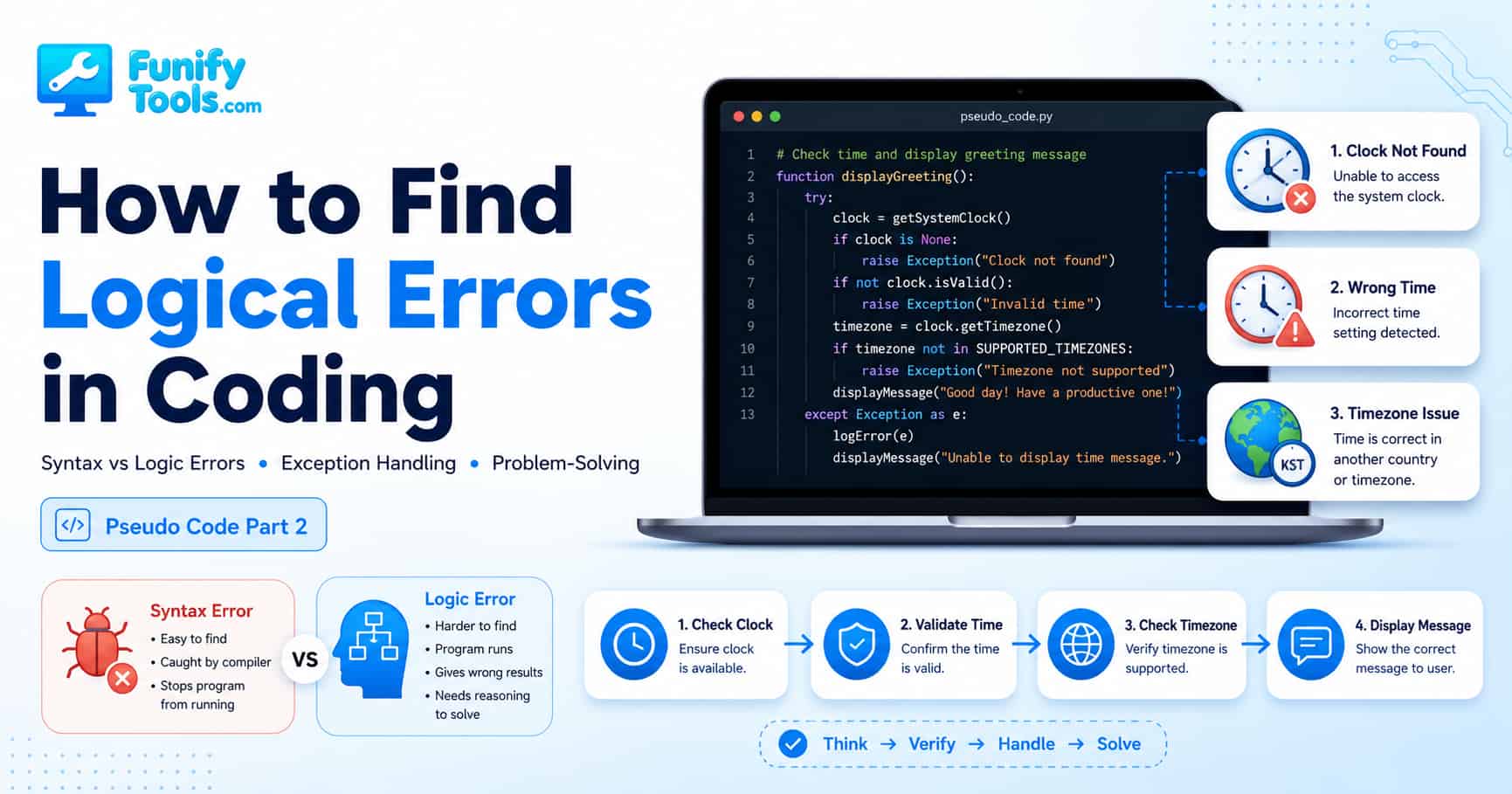
From Pseudo Code to Robust Programs: Syntax vs Logic Errors
Hello everyone~
In the previous session, we built a very simple idea using something called pseudo code. The rule itself was easy to understand: if the current time is 19:00, or 7 PM, display “I love you ❤️.” If it is not 19:00, display “I like you ❤️” instead.
At first glance, that sounds almost too simple to be called programming. But actually, this is the exact kind of thinking that sits at the center of coding. A program is not just a bunch of strange symbols typed into a black screen. It is a sequence of decisions. We define a condition, decide what should happen when that condition is true, and then decide what should happen when it is not true.
now = datetime.now() → check the current timeif now.hour == 19: → if the current hour is 19...print("I love you ❤️") → display “I love you ❤️” on the screenelse: → otherwise...print("I like you ❤️") → display “I like you ❤️”
This little example shows the basic shape of programming very well. We check something, compare it with a condition, and choose an action based on the result. That is why pseudo code is so helpful for beginners. It removes the pressure of perfect grammar and lets us focus on the most important part first: the logic.
But here is where things become more interesting. The real world is not as clean as our first idea. When we imagine a program in our head, everything usually works perfectly. The clock exists. The time is correct. The computer understands what we mean. The user behaves exactly as expected. Nothing strange happens.
Then we run the program.
And suddenly, something is off.
Maybe the program does not run at all. Maybe it runs, but the message appears at the wrong time. Maybe it works on your computer but not on someone else’s computer. Maybe it worked yesterday, but today it behaves differently. This is the part of coding that surprises a lot of beginners: writing code is only one part of the job. Thinking about what can go wrong is just as important.
When we write code, we can run into many kinds of problems. If we leave out environment setup issues for now, most beginner-level errors can be roughly divided into two big groups:
- Syntax Errors
- Logic Errors
What Is a Syntax Error?
A syntax error is like a grammar mistake in a programming language. The computer has strict rules about how code must be written. If you break those rules, the program may not even start.
For example, if you accidentally type Srint instead of print, the computer does not know what you mean. You might understand it as a typo, but the computer will not politely guess your intention. It will simply say, “I do not recognize this.”
The same thing can happen if you forget a parenthesis, miss a quotation mark, use the wrong indentation, or write a keyword incorrectly. These mistakes are annoying, but they are usually easy to find. Most modern editors will underline the problem, show a warning, or give you an error message.
In that sense, syntax errors are often beginner-friendly errors. They may look scary at first, but the computer is basically telling you, “Something is written incorrectly here.” Once you learn how to read the message, you can usually fix the problem fairly quickly.
What Is a Logic Error?
A logic error is more subtle. The code may be written correctly. The program may run without any warning. There may be no red underline, no crash, and no obvious error message. But the result is still wrong.
That is what makes logic errors harder. The computer is not saying, “I cannot understand this.” Instead, it is doing exactly what you told it to do. The problem is that what you told it to do is not the same as what you actually wanted.
For example, if your program is supposed to show “I love you ❤️” at 7 PM, but it shows the message at 7 AM, the syntax might be perfect. The program might technically be working. But the logic is wrong.
This is why logic errors are so important in coding. They remind us that programming is not just about writing valid code. It is about writing code that correctly represents our intention.
No matter how advanced programming tools become, this part still requires human reasoning. AI tools can help review code, suggest possible problems, and explain suspicious logic. But understanding the actual intention behind the program is still our responsibility. A tool can tell us what the code does. We have to decide whether that behavior is correct.
In other words, coding is not only about grammar. It is about designing the order of thought.
Going Back to Our Simple Time Program
Now let’s return to the small program from earlier. The first version looked simple enough. Check the current time. If the hour is 19, print one message. Otherwise, print another message.
But if we slow down and think carefully, there are several hidden questions inside this tiny program.
1. What if the program cannot check the clock?
This sounds unlikely at first, but programs often depend on resources outside themselves. A clock, a file, a network connection, a database, a user setting, an API, or a device permission may not be available when the program needs it.
If our program cannot get the current time, it cannot make the correct decision. In that situation, the program should not pretend everything is fine. It should clearly say that the time could not be checked.
2. What if the time is incorrect?
The program may successfully read the time, but the time itself may be wrong. The computer’s system clock could be set incorrectly. The user might have changed the time manually. The device might not have synchronized with a reliable time source. The battery inside an old computer might even cause the system clock to reset.
From the program’s point of view, it received a valid time value. But from our point of view, that value may be unreliable. This is an important difference. Data can be available and still be wrong.
3. Which country’s 19:00 are we talking about?
This is one of the easiest logical details to forget. Time is not universal in the way beginners often imagine it. Korea, the United States, Europe, Japan, Australia, and many other places all use different time zones. Even inside one country, there may be multiple time zones.
If you say “show this message at 19:00,” the program needs to know 19:00 in which standard time. Korea Standard Time? New York time? Los Angeles time? UTC? Or another time zone chosen by the user? The answer matters.
Without that detail, the program may run perfectly and still show the message at the wrong moment.
A Small Story About a Very Awkward Bug
Let’s imagine a scene.

Suppose you prepared a small surprise event for someone you love. You wrote a simple program that is supposed to display “I love you ❤️” exactly at 7:00 PM. Nothing too complicated. Just a sweet little message at the perfect moment.
You are sitting together at a restaurant. Dinner is going well. The lighting is soft. The music is calm. The atmosphere is just right. In your head, everything is already planned. At exactly 7:00 PM, the message will appear, and the moment will feel natural and romantic.
Then 7:00 PM arrives.
Nothing happens.
You glance at the screen. Still nothing. Your partner looks at you and asks:
“Huh...? Were you trying to show me something?” 😅
Now you are sweating a little. You check the device. You check the code. You check the time. And then you realize the clock was set ten minutes fast. The program did not fail because of a typo. It failed because your logic trusted the wrong time.
This is a funny example, but it teaches a real lesson. A small logical gap can ruin the result of a program, even when the code itself looks fine.
In real software, this kind of issue can become much more serious. A reminder app may notify the user too late. A payment system may apply a discount after the deadline. A booking system may show the wrong available time. A security system may allow access when it should not. A game may trigger an event at the wrong moment. A small assumption can turn into a real bug.
That is why logical completeness matters. A reliable program is not one that only works in the happy path. It is one that still behaves reasonably when something unexpected happens.
The Difference Between “It Runs” and “It Works”
Beginners often feel relieved when the code finally runs without errors. That feeling is completely understandable. The first time you make a program run, it feels like a victory.
But there is a big difference between “the program runs” and “the program works correctly.”
A program can run and still calculate the wrong number. It can run and still show the wrong message. It can run and still save data in the wrong place. It can run and still confuse the user. The absence of a crash does not automatically mean the logic is correct.
This is one of the biggest mindset shifts in programming. We should not only ask, “Does the code run?” We should also ask:
- Does it produce the result I intended?
- Does it handle unusual situations?
- Does it fail clearly when something goes wrong?
- Does it depend on an assumption that may not always be true?
- Would this still work on another computer, in another country, or with another user?
These questions are where real problem-solving begins.
Case 1: The Clock Cannot Be Accessed
Let’s start with the first possible problem: the program cannot check the time.
If the program fails to access the clock, it cannot continue with the original plan. There is no point in checking whether the hour is 19 if we do not have a valid time value in the first place.
In this case, the program should handle the problem gracefully. Instead of crashing or showing a confusing error, it can display a simple message:
“Unable to check the time because the clock cannot be found.”
This is the basic idea of exception handling. Exception handling means preparing a response for situations where something unexpected happens. It does not magically fix every problem, but it prevents the program from falling apart without explanation.
For users, a clear error message is much better than silence. If nothing happens, the user has no idea what went wrong. But if the program says it cannot check the time, the user immediately understands the problem area.
Case 2: The Time Is Wrong
The second issue is more difficult. The clock exists, and the program successfully reads it. But what if the time itself is wrong?
This is the kind of bug that can be hard to notice because the program appears to be doing its job. It checks the time. It compares the hour. It prints a message. Everything looks normal from the outside.
But if the computer time is wrong, the output is wrong too.
One way to reduce this risk is to compare the local time with a more reliable standard time, such as server time. If the difference is too large, the program can stop and warn the user instead of continuing with bad data.
“The time is incorrect. Unable to display the message.”
This may feel like extra work, but it is an important habit. Running a program with unreliable data is like setting your alarm with a broken watch. The alarm may technically work, but you still cannot trust it.
Many real-world bugs happen because a program trusts data too easily. The data exists, so the program assumes it is correct. But good logic does not stop there. Good logic asks whether the data makes sense.
Case 3: The Time Zone Problem
The third issue is the time zone.
If this program is meant to display a message at 7 PM in a specific standard time, then the code should say that clearly. It should not depend on whatever time zone the computer happens to be using.
For example, if the program runs on a server set to UTC, 19:00 on that server may not be 19:00 in the standard time you actually intended. If the program runs on a laptop in another country, 19:00 there may be a completely different moment for the user. The program might technically be correct according to the computer’s local time, but wrong according to the actual purpose of the program.
That is why it is better to explicitly use the intended standard time, such as Korea Standard Time (KST), UTC, Eastern Time, Pacific Time, or whichever time zone the user selected. The point is not that KST is always correct. The point is that the required standard time must be defined clearly. The more clearly we define our assumptions, the fewer hidden bugs we create.
This is not only a time-related lesson. The same idea applies to many parts of programming. If your logic depends on a currency, language, country, date format, measurement unit, file path, or user setting, you should make that assumption clear.
Improving the Logic Step by Step
Now let’s reorganize the logic in a safer way.
-
Try to check the current time.
-
If the time cannot be checked:
→ Display “Unable to check the time because the clock cannot be found.” and stop. -
If the current time appears to be incorrect:
→ Display “The time is incorrect. Unable to display the message.” and stop. -
Use the intended standard time as the target time zone.
-
If the time in that selected standard time is 19:00:
→ Display “I love you ❤️”. -
Otherwise:
→ Display “I like you ❤️”.
The improved version is longer than the first version. It may look less simple. But that does not mean it is worse. In programming, short code is not always better code. Code should be clear, reliable, and appropriate for the situation.
The first version only handled the happy path. The improved version thinks about what can go wrong. That is the difference between a quick experiment and a more robust program.
Example Python Code
Here is one way the improved idea could look in Python:
from datetime import datetime


                import pytz

                try:
                tz = pytz.timezone("Asia/Seoul")       # Set the intended standard time
                now = datetime.now(tz)                 # Get current time in that standard time

                except Exception:
                print("Unable to check the time because the clock cannot be found.")

                else:
                # In a real program, this could be compared with trusted server time.
                standard_now = datetime.now(tz)


                if now.hour != standard_now.hour:
                    print("The time is incorrect. Unable to display the message.")
                elif now.hour == 19:
                    print("I love you ❤️")
                else:
                    print("I like you ❤️")
You do not need to understand every detail of this code right away. The important part is the thinking process behind it.
First, we try to get the time. If that fails, we handle the error. If it succeeds, we continue. Then we check whether the time is usable. After that, we compare the hour and decide which message to display.
This is the habit that matters: break the problem into smaller steps, check each step, and decide what should happen when something goes wrong.
Why Exception Handling Matters
Exception handling may sound like an advanced topic, but the basic idea is very simple. It means the program is prepared for unexpected situations.
Imagine you are following a recipe. The recipe says, “Add two eggs.” But when you open the refrigerator, there are no eggs. A careless recipe would just stop there. A better recipe might say, “If there are no eggs, use a substitute or choose another dish.”
Programs need the same kind of thinking. If a file is missing, what should happen? If the internet connection fails, what should happen? If the user enters nothing, what should happen? If the number is negative, what should happen? If the date is in the wrong format, what should happen?
Exception handling does not mean we expect everything to go wrong. It means we respect the fact that real environments are messy.
A beginner may write code that only works when every condition is perfect. A more experienced programmer writes code that still responds clearly when conditions are not perfect.
Logical Errors Are Often Hidden Assumptions
Many logic errors come from hidden assumptions.
We assume the time is correct. We assume the user typed a number. We assume the file exists. We assume the network is connected. We assume the list is not empty. We assume the button will only be clicked once. We assume the user is in the same country. We assume the data has the format we expected.
Sometimes those assumptions are true. Sometimes they are not.
A good way to find logical errors is to look for those assumptions and ask, “What happens if this is not true?”
- What if the value is empty?
- What if the value is too large?
- What if the value is too small?
- What if the user enters text instead of a number?
- What if the clock is wrong?
- What if the time zone is different?
- What if the program runs twice?
- What if the internet connection disappears halfway through?
These questions may feel simple, but they are powerful. They help you find problems before users find them.
Pseudo Code Is a Great Tool for Finding Logic Problems
This is one reason pseudo code is so useful. When you write pseudo code, you are not distracted by exact syntax. You can focus on the flow of thought.
Before writing real code, try describing the program in plain language. For example:
Try to get the current time in the intended standard time.


                If the time cannot be checked:
                Show an error message and stop.

                If the time looks incorrect:
                Show a warning message and stop.

                If the current hour is 19:
                Show "I love you ❤️".

                Otherwise:
                Show "I like you ❤️".
This version is easy to read, even if you are not comfortable with Python yet. And because it is easy to read, it is also easier to review. You can look at each line and ask whether something is missing.
That is the real value of pseudo code. It helps you practice logical thinking before you fight with syntax.
How to Practice Finding Logical Errors
If you are new to coding, one of the best exercises is to take a simple program and intentionally ask uncomfortable questions about it.
For example, suppose you write a program that checks whether a student passed a test. The first logic might be:
If score is 60 or higher:
                Show "Pass"


                Otherwise:
                Show "Fail"
That seems fine, but now we can ask:
- What if the score is empty?
- What if the score is written as text?
- What if the score is 101?
- What if the score is -5?
- What if the passing score changes later?
Suddenly, a simple program becomes a real thinking exercise. This does not mean you need to make every beginner program extremely complicated. It means you should slowly build the habit of seeing beyond the first obvious case.
The same applies to our time program. The first idea was simple. But once we asked what could go wrong, we found missing clock access, wrong system time, and time zone confusion.
Debugging Is Not Guessing
When beginners encounter a bug, they often start changing random parts of the code and hoping the problem disappears. I completely understand that feeling. When something does not work, it is tempting to poke around until the output changes.
But debugging is not guessing. Debugging is investigation.
A better approach is to check the program step by step:
- What did I expect to happen?
- What actually happened?
- At which step did the result become different from my expectation?
- What value did the program use at that moment?
- Was my assumption correct?
For our time program, we could print the current time before the condition runs. We could check the time zone. We could compare the computer time with standard time. We could test the program with different hours.
The goal is to find the exact point where the program’s behavior and our intention separate.
The Most Important Thing in Coding Is Logical Accuracy
The most important thing in coding is logical accuracy.
If you build something carelessly, the program will behave carelessly. It may seem to work for a while. It may even pass a quick test. But eventually, an unexpected situation will reveal the weak point.
This is very similar to everyday life. If we make plans without thinking about possible problems, the plan may fall apart at the worst moment. But if we think ahead, prepare for exceptions, and check our assumptions, things usually go more smoothly.
Of course, nobody writes perfect logic from the beginning. Even experienced developers make mistakes. The difference is that they know how to question their own logic, test different cases, and improve the program step by step.
That is why coding is such good training for the mind. It teaches us to be specific. It teaches us to think in order. It teaches us to ask what happens next. It teaches us not to trust vague ideas too easily.
Why This Matters for Students
For students, this kind of logical training is extremely valuable. Coding is not only a technical skill. It is a way to practice structured thinking.
Every line of code contains a small decision. Every condition contains a reason. Every error teaches you something about an assumption you made. When you practice coding, you are also practicing how to break a problem down, check each part, and build a solution carefully.
This skill is useful far beyond programming. Math, science, writing, planning, business, design, and even daily decision-making all benefit from clear logic. When you learn how to ask, “What exactly is the condition?” and “What happens if this condition is not true?” you become better at solving problems in general.
So even if you do not become a professional developer, learning how to think through code is still worth it.
Try This Yourself
Today, we looked at why programs need to be logically safe and why it is important to fill logical gaps before they cause problems.
Now try practicing with your own pseudo code. Pick a very simple idea and ask what could go wrong.
- What if there is no time value?
- What if the input is wrong?
- What if the condition does not match?
- What if the user does something unexpected?
- What if the program runs in another country?
- What if the data is missing?
Write down how your program should respond in each case. You do not need to write perfect code yet. Start with plain language. The goal is to train your coding intuition.
Once you become comfortable thinking this way, real code becomes much easier to write. You will not just be typing commands. You will understand why each step exists.
And remember — the most important thing is this sense of logic. Being able to set up conditions, consider exceptions, and understand what each line means is the true starting point of programming.
With this mindset, you will not just become someone who can write code. You will become someone who can think clearly, find problems, and build better solutions in any field.
Next time, we will look at another key concept in programming: variables.
Thank you so much for reading. Wish you all a happy day 😊
This article is also available in Korean: Read the Korean version