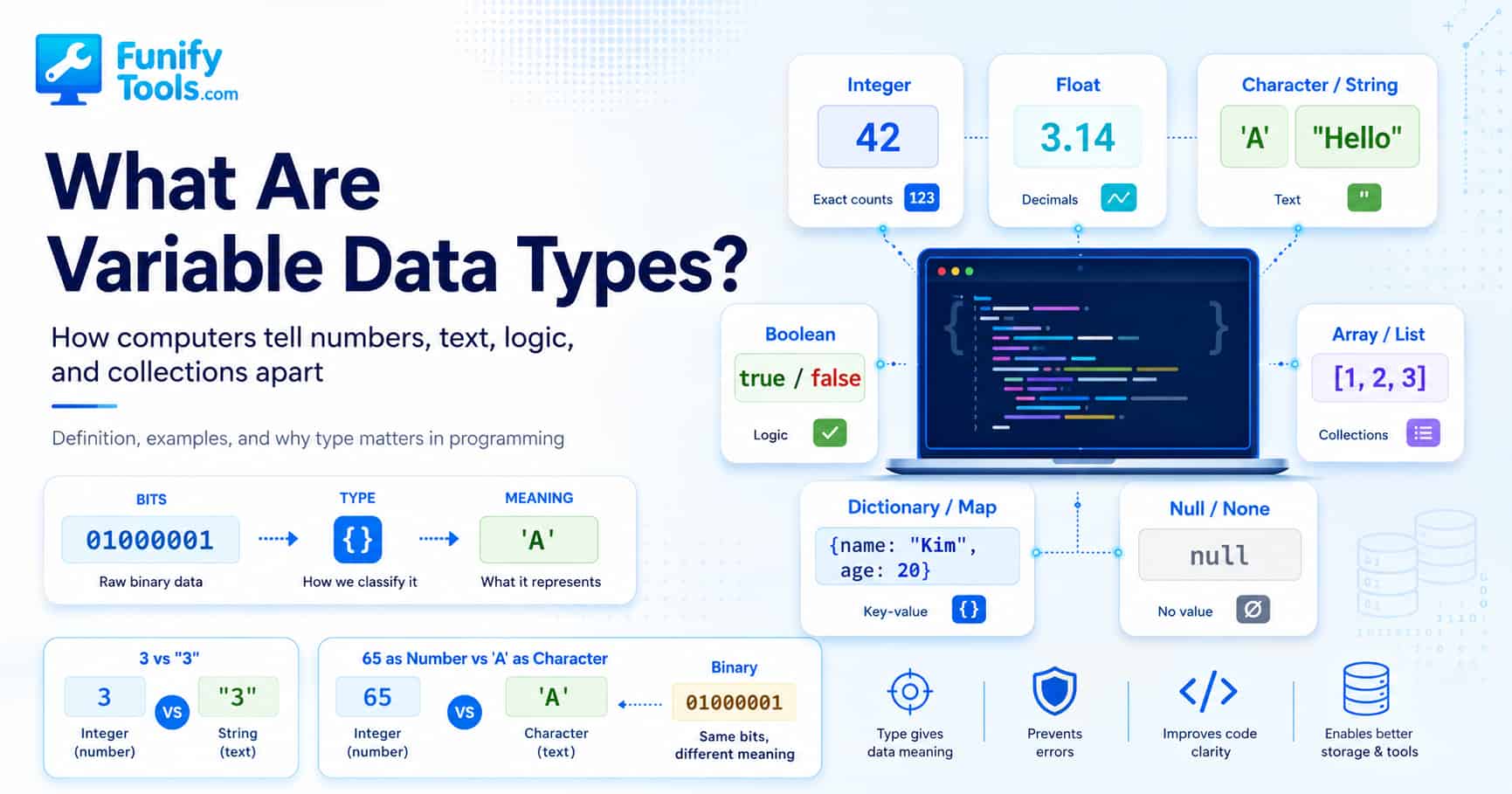
Understanding Variable Data Types
Hello. In this post, let’s take a closer look at variable data types.
When people first start learning programming, variables often feel simple. A variable is just a place to store something, right? You put a value into it, give it a name, and use it later. That part is true. But the value inside the variable is not just “some value.” It always has a nature, a role, and a way it should be handled. That nature is what we call a data type.
In daily life we talk about “kinds” all the time, even when we do not notice it. When ordering coffee, we distinguish between iced Americano and hot cafe latte. They are both drinks, but they are not handled the same way. One needs ice, one needs steamed milk, one may come in a different cup, and the person making it follows a different process. The “kind” of drink changes how it is prepared.
Programming works in a similar way. A computer does not simply receive a value and magically know what to do with it. It needs to know what kind of value it is. Is this a number that can be calculated? Is it a piece of text that should be displayed? Is it a true-or-false answer used for a decision? Is it a collection that contains many values? The answer changes everything.
Imagine you are paying at a convenience store. You put a candy and a drink on the counter, and then you say, “Please give me a receipt.” The clerk can ring up the candy and the drink because they have prices. But the sentence “Please give me a receipt” is not a price. It is a request. The clerk understands the difference because humans are good at context. Computers are not like that. A computer needs a clear rule that tells it whether something is a number, text, logic, or something else.
This is why the number 3 and the string "3" are different. They look almost the same to a person, but to a computer they are not the same thing. The first one is a number. The second one is text that happens to look like a number. It is made of a character inside quotation marks. That small difference can completely change how the value behaves.
Computers also have this idea of “kind.” In programming, we call it a data type. A data type is the rule or label that tells the computer what kind of data it is looking at. It answers a simple but important question: “What is this value supposed to be?”
A person can read 100 as 100 won, 100 points, 100 degrees, 100 students, or 100 percent depending on the situation. Humans fill in meaning from context. A computer does not naturally understand that kind of context. To a computer, everything is ultimately stored as electrical signals, and those signals are represented as zeros and ones. Whether those bits should become a number, a letter, an address, an image color, or a true-or-false answer depends on how the data is interpreted.
That is the real reason data types matter. They are not just vocabulary you memorize for a programming test. They are the rules that allow a computer to treat data correctly. A number should be calculated. Text should be displayed, searched, joined, or compared. A boolean should decide whether a block of code runs. A list should hold many values in order. A dictionary should connect keys to values. Each type gives the computer a different set of expectations.
Suppose there were no data types at all. Every value would just be a “thing.” Then the computer would not know the difference between 1 and "1". Should 1 + 1 become 2? Yes, if both values are numbers. But should "1" + "1" become 2 or "11"? If they are strings, joining them into "11" makes sense. Without types, the computer would have no reliable way to choose.
A data type is the minimum order that prevents this confusion. It gives each value a proper container and a proper set of rules. Numbers go with arithmetic. Text goes with text operations. True-or-false values go with conditions. Collections go with repeated access and organization.
When a computer receives data, it first needs to know how that data should be treated. Only then can it store, compare, calculate, display, or move the value correctly. This is why all the languages we commonly use — C, C++, Java, JavaScript, Python, Go, Rust, and many others — share one important principle beneath their different styles:
“Every piece of data has a specific type.”
The syntax may change from language to language. Some languages ask you to declare the type clearly. Others figure it out automatically when the program runs. But either way, the type exists. The computer still needs a way to know what kind of value it is handling.
Integer
Among data types, the first one that usually comes to mind is the number type. Numbers are used everywhere in programming. They help us count items, calculate prices, measure time, compare scores, repeat loops, and store quantities. But even inside the world of numbers, there are important differences.
An integer is a number without a decimal point. Values like 1, -2, 100, and 2025 are integers. They match the kind of numbers we use when counting things in real life: three apples, twenty students, five files, ten comments, or one hundred points.
Integers are especially useful when the value should be whole. For example, a website may count how many users signed up today. A game may count how many lives a character has left. A shopping cart may count how many items are inside it. These are not values that normally need decimal points. You do not usually have 3.7 students or 2.4 browser tabs. For this kind of situation, integers make sense.
Integer operations are usually exact. If you add 10 and 20, you expect 30. If you subtract 5 from 12, you expect 7. This reliability makes integers very important in programming, especially when accuracy matters.
Floating-Point Numbers
By contrast, floating-point numbers include decimal values. These are numbers like 1.5, 3.14159, -7.25, or 0.001. In many languages, you will see names like float or double.
Floating-point numbers are useful when we need to represent continuous measurements. Temperature, height, weight, distance, speed, screen scale, animation timing, and scientific measurements often need decimal points. If you are calculating the average rating of a product, the result may be 4.7. If you are measuring a person’s height, you may write 175.5 centimeters. If you are drawing graphics on a screen, positions may not always land on whole numbers.
However, floating-point numbers come with an important warning: they are often approximate. Computers store floating-point values in a special binary format, and some decimal numbers cannot be represented perfectly. That is why you may sometimes see strange results like 0.1 + 0.2 producing something very close to 0.3, but not exactly 0.3 in some languages.
This does not mean floating-point numbers are bad. They are extremely useful, and modern software relies on them constantly. But it does mean we should understand their limits. For graphics, physics, games, and measurements, tiny rounding differences are usually acceptable. For money, they can be dangerous.
That is why in finance or payment systems, programmers often avoid normal floating-point calculations. Instead of storing 100.25 dollars as a floating-point value, they may store it as 10025 cents using an integer. This keeps the calculation exact and avoids tiny rounding errors that could become serious when repeated many times.
Characters and Strings
Next are characters and strings. A character is a single symbol, such as 'A', '1', '?', or '가'. A string is a sequence of characters, such as "Hello", "123", "apple juice", or "Welcome to Funifytools".
Strings are everywhere because programs almost always need text. Usernames, emails, search keywords, file names, titles, messages, URLs, labels, descriptions, and blog posts are all handled as strings. Even a phone number is often stored as a string, not a number. Why? Because we do not calculate with phone numbers. We display them, save them, search them, or send them. A phone number may begin with zero, include a country code, or contain hyphens. Treating it as plain text is usually safer.
This is one of the most useful beginner lessons about data types: something that looks like a number is not always meant to be a number. A ZIP code, student ID, product code, passport number, and phone number may all contain digits, but they are usually identifiers. You do not add them together. You do not divide them. You keep them as text because their purpose is not arithmetic.
Strings also behave differently from numbers. For example, "Hello" + "World" usually becomes "HelloWorld". That operation is called concatenation. It joins text together. If you want a space, you need to include it yourself, like "Hello" + " " + "World". The result becomes "Hello World".
This is very different from numeric addition. 10 + 20 becomes 30, but "10" + "20" may become "1020", depending on the language. The symbols look similar, but the data type changes the meaning of the operation.
Boolean
Next is boolean. A boolean has only two possible values: true or false. It may look simple, but it is one of the most important data types in programming.
Booleans are the foundation of decisions. Any time a program asks a question, the answer usually becomes a boolean. Is the user logged in? Is the password correct? Is the cart empty? Is the file uploaded? Is the number greater than 10? Is dark mode turned on? Each of these questions can be answered with true or false.
This is why conditionals such as if, else, and loops such as while rely heavily on booleans. A program can say, “If this condition is true, run this code. Otherwise, do something else.” That simple pattern is behind login systems, form validation, game rules, menu behavior, error handling, and countless other features.
For example, if an online store has a variable called isPaid, the program can check whether it is true before showing a download link. If isPaid is false, the program can show a payment button instead. The boolean value becomes a switch that controls what happens next.
Composite Types
So far, we have looked at simple values: numbers, text, and true-or-false logic. But real programs often need to manage many values together. That is where composite types come in. Composite types are data types that can hold multiple pieces of data.
Arrays or lists store multiple values in order. For example, a list of fruits might look like ["apple", "banana", "orange"]. A list of scores might look like [90, 85, 100]. A list of todo items might contain several strings that the user typed.
The important idea is order. In many programming languages, the first item in an array is at index 0, the second item is at index 1, the third item is at index 2, and so on. This can feel strange at first because humans usually start counting from 1. But in programming, zero-based indexing is very common.
Arrays are useful when you want to repeat the same action for many values. If you have a list of scores, you can loop through the list and calculate the average. If you have a list of products, you can display each product card on a web page. If you have a list of comments, you can render them one by one.
Different languages draw the line between arrays and lists in different ways. In some languages, arrays have a fixed size, while lists can grow and shrink more freely. In other languages, the terms are used more casually. But the basic idea is the same: a collection lets you store more than one value under one structure.
Dictionary or Map
The next step is the dictionary or map. If arrays distinguish values by order, dictionaries distinguish values by keys.
A dictionary stores data as key-value pairs. For example, instead of saying “the first value is John, the second value is 25, and the third value is Seoul,” we can write something more meaningful:
{ "name": "John", "age": 25, "city": "Seoul" }
This structure is easier to understand because each value has a label. The key "name" points to "John". The key "age" points to 25. The key "city" points to "Seoul". Instead of remembering positions, the program can ask for the value by name.
This is especially useful in web development. The JSON format used by many websites and APIs is essentially built around this kind of key-value structure. When a server sends user data to a browser, it often uses JSON. When a weather app receives temperature, city name, humidity, and forecast data, that information is often organized with keys and values.
Dictionaries are powerful because they match the way people often describe information. We do not naturally say, “The user’s third value is Seoul.” We say, “The user’s city is Seoul.” A dictionary lets the code express that idea more clearly.
Null / None / Nil
There is another interesting and sometimes confusing data type: Null. Depending on the language, you may see it called null, None, or nil. It means that no value exists.
This is different from zero. Zero is a number. It means there is a value, and that value is 0. Null means there is no value there at all. It is also different from an empty string. An empty string "" is still a string. It simply contains no characters. Null means the value itself is missing.
That difference matters a lot. Imagine a form where a user can enter their age. If the value is 0, that could mean the age is zero. If the value is empty, it may mean the user typed nothing. If the value is null, it may mean the data was never provided or has not been loaded yet. These cases can lead to different behavior in a program.
Null is useful because real-world data is messy. Sometimes a user has not uploaded a profile image. Sometimes a product has no discount. Sometimes an API response does not include a field. Sometimes a database column is empty because the information is unknown. Null gives programmers a way to represent “nothing is here.”
At the same time, null can cause many bugs. If a program expects a string but gets null, it may crash when trying to call a string method. If it expects a user object but gets null, it cannot access the user’s name. This is why many programming languages and frameworks spend a lot of effort helping developers handle null safely.
How Data Types Change Meaning
The data types we have discussed so far exist in some form in almost every language: integer, float, character, string, boolean, array, dictionary, and null. These types form a basic scaffolding for programs. Once you understand them, many programming concepts become much easier to follow.
A data type also decides how the computer interprets bits. This part is important because, at the lowest level, computers do not store “letters” or “sentences” in the same way humans imagine them. They store patterns of bits. The same pattern can mean different things depending on the type and encoding.
For example, the same 8 bits could be interpreted as the number 65. But if those bits are interpreted through an ASCII-style character system, they could represent the character 'A'. The raw bits did not change. The interpretation changed.
This is similar to how the same word can mean different things in different languages. The word “Gift” means “present” in English, but “poison” in German. The letters are the same, but the system used to interpret them is different. Data types do something similar for computers. They provide the interpretation rule.
This is why programmers cannot ignore types. A value is not only about what it looks like on the screen. It is about how the program understands it internally. The value "100" may look like a number, but if it is stored as a string, the program treats it as text. The value 100 may look similar, but if it is stored as an integer, the program can calculate with it.
What Happens When You Use the Wrong Type?
So what happens if you use the wrong type? Sometimes the program gives you an error immediately. Sometimes it quietly converts the value for you. Sometimes it works at first and then creates a bug much later. That is what makes type problems frustrating.
Trying to add the string "10" and the number 10 often causes confusion. Some languages reject it because the types do not match. Other languages try to help by converting one side automatically. In JavaScript, for example, "10" + 5 becomes "105". The number 5 is converted into text, and the two strings are joined together.
That behavior can be convenient, but it can also become a source of subtle bugs. A beginner may expect "10" + 5 to produce 15, but the result becomes "105". The computer is not being random. It is following rules. The problem is that the programmer and the computer are not thinking about the value in the same way.
This is one reason many programmers care about type safety. A language with stricter type rules may feel a little more demanding at first, because it forces you to be clear. But that strictness can prevent mistakes. A more flexible language may feel easier at the beginning, but it can allow confusing conversions if you are not careful.
Neither approach is automatically better for every situation. Python, JavaScript, Java, C, Go, Rust, and other languages all make different choices about how types should be declared, checked, and converted. What matters most is understanding the rules of the language you are using.
Static Typing and Dynamic Typing
When talking about data types, you may also hear the terms static typing and dynamic typing. These describe when and how a programming language checks types.
In a statically typed language, the type of a variable is usually known before the program runs. Languages like C, C++, Java, Go, Rust, and TypeScript often work this way. You may need to declare that a variable is an integer, a string, or a boolean. The benefit is that many type-related mistakes can be caught early, before the program is running in the real world.
In a dynamically typed language, the type is usually checked while the program runs. Python and JavaScript are common examples. You can assign a number to a variable, and later assign a string to the same variable. This can make the code feel flexible and quick to write, especially for small scripts or beginner projects. But it also means you need to be careful, because some type mistakes may only appear when that specific line of code runs.
For beginners, this can feel confusing because different languages teach slightly different habits. In Java, you may write something like int age = 25;. In Python, you may simply write age = 25. The Python version looks like it has no type, but the value still has one. It is just being handled automatically.
The key point is this: whether you write the type yourself or the language figures it out, the type still exists. The computer still needs to know what kind of data is being stored.
Why Types Matter in Real Programs
Data types are not just theory. They affect real programs every day. A login form needs strings for email and password fields. A shopping cart needs numbers for prices and quantities. A settings page needs booleans for on/off switches. A search result page needs arrays to hold multiple results. A user profile may be represented as a dictionary or object with keys such as name, email, profile image, and account status.
Even a simple calculator app depends on types. The numbers typed by the user often arrive as strings from an input box. Before the calculator can add them, the program needs to convert those strings into numbers. If it forgets to do that, "2" + "3" may become "23" instead of 5. That is a classic beginner bug, and it comes directly from misunderstanding data types.
A weather app also depends on types. The city name is text. The temperature is usually a number. The chance of rain may be a number or percentage. The list of hourly forecasts is an array. Each forecast item may be an object or dictionary. Whether the user allowed location access may be a boolean. If some weather data is missing, a field may be null.
Once you start noticing this, you can see data types everywhere. They are the invisible structure behind software. The screen may show buttons, cards, charts, and text, but behind that screen the program is constantly organizing values by type.
Choosing the Right Type
A good programmer does not only ask, “What value do I need?” A good programmer also asks, “What type should this value be?” That question prevents many problems.
If the value needs arithmetic, use a number. If it needs exact counting, an integer is usually a good fit. If it needs decimals and approximation is acceptable, a floating-point number may work. If it is text for display, use a string. If it represents yes/no, on/off, pass/fail, or allowed/blocked, use a boolean. If it contains multiple values in order, use an array or list. If it connects names to values, use a dictionary, map, or object. If the value may be missing, handle null carefully.
The right type makes code easier to read. It also makes the program safer. When a variable name and type match the real meaning of the data, other people can understand the code faster. Even your future self will thank you when you return to the code months later.
For example, a variable named userAge should probably be a number. A variable named phoneNumber should probably be a string. A variable named isLoggedIn should probably be a boolean. A variable named cartItems should probably be a list or array. The name and the type work together to explain the programmer’s intention.
Data Types Are Rules, Not Just Labels
Ultimately, data types are order and rules. Every piece of data belongs in a fitting container. Numbers belong with numbers. Text belongs with text. Booleans belong with logic. Lists belong with repeated values. Dictionaries belong with key-value information. Null belongs where a missing value must be represented carefully.
Once you understand data types, programming starts to feel less mysterious. Many errors that looked random become easier to explain. Many language differences become easier to compare. Many beginner mistakes become easier to avoid. You begin to understand not just what the code says, but how the computer is interpreting each value.
Syntax varies across languages, but the computer’s way of seeing the world is surprisingly consistent. It does not understand meaning the way humans do. It needs structure. It needs rules. It needs types.
That is the main takeaway: a variable is not just a named box. It is a named box holding a specific kind of value. And that kind of value decides what the program can safely do with it.
Thank you for reading this post. Wishing you a happy day.
This article is also available in Korean: Read the Korean version