The 10-Second Explanation
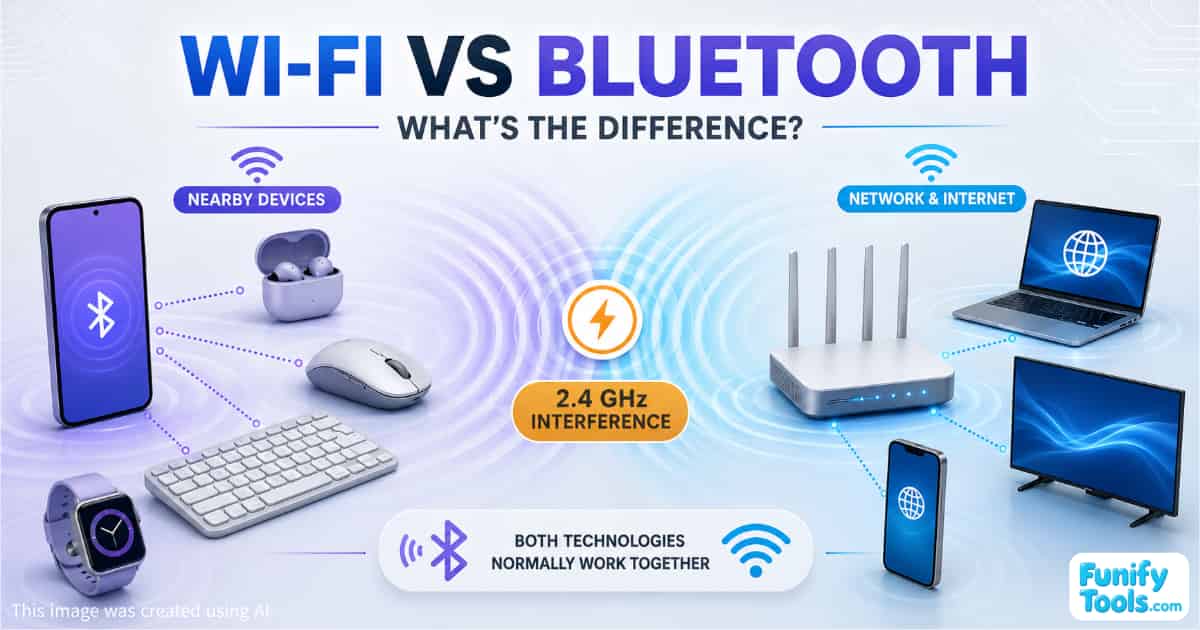
Bluetooth connects nearby devices such as earbuds, keyboards, mice and smartwatches. It uses relatively little power and is designed for short-range connections.
Wi-Fi connects devices to a local network, usually through a router. It offers higher speeds and is commonly used for internet access, video streaming and large file transfers.
In simple terms:
Bluetooth = connecting nearby devices
Wi-Fi = faster networking and internet access
Bluetooth and 2.4 GHz Wi-Fi use overlapping frequency ranges, so interference can sometimes cause audio dropouts or connection problems.
What Is Bluetooth?
Bluetooth is a wireless technology designed primarily to connect devices over relatively short distances.
It is commonly used with:
- Wireless earbuds and headphones
- Keyboards and mice
- Smartwatches and fitness trackers
- Game controllers
- Car audio systems
- Health and IoT devices
One of Bluetooth's main advantages is its relatively low power consumption. This makes it particularly suitable for small battery-powered devices that need to operate for long periods without frequent charging.
Bluetooth Low Energy, commonly known as BLE, is designed for devices that exchange small amounts of data while consuming very little power. Smartwatches, sensors, trackers and smart-home devices often use it.
Bluetooth is not usually intended for very large or continuous data transfers. Its main strength is maintaining convenient connections between nearby devices.
What Is Wi-Fi?
Wi-Fi is a wireless networking technology.
A device normally connects to a Wi-Fi router or access point, which then allows it to communicate with other devices on the same network. The router may also provide access to the internet.
Wi-Fi is commonly used for:
- Browsing websites
- Watching YouTube or streaming services
- Downloading files
- Video calls
- Online gaming
- Connecting smart TVs and computers
- Transferring data across a local network
Compared with Bluetooth, Wi-Fi generally offers higher data-transfer speeds and greater networking capacity. It is therefore better suited to activities that require large amounts of data.
However, Wi-Fi usually consumes more power than Bluetooth. That is one reason small accessories such as earbuds, watches and keyboards normally rely on Bluetooth instead.
Does Wi-Fi Always Mean Internet Access?
Wi-Fi and the internet are related, but they are not the same thing.
Wi-Fi creates a wireless connection to a router or local network. The router then connects that network to the internet.
This means a device can be successfully connected to Wi-Fi even when the internet connection itself is unavailable.
For example, computers on the same Wi-Fi network may still be able to communicate with a local printer or share files even if the external internet line has stopped working.
A more accurate description is therefore:
Wi-Fi provides wireless network access, and that network usually provides access to the internet.
The Main Differences Between Wi-Fi and Bluetooth
| Feature | Bluetooth | Wi-Fi |
|---|---|---|
| Primary purpose | Connecting nearby devices | Connecting to a local network |
| Common examples | Earbuds, keyboards and watches | Laptops, phones, TVs and game consoles |
| Typical power use | Relatively low | Usually higher |
| Data speed | Lower | Higher |
| Typical range | Short range | Generally longer |
| Router required | No | Usually requires an access point or router |
| Best suited for | Accessories and small data exchanges | Streaming, browsing and file transfers |
The exact speed, range and power consumption vary depending on the Bluetooth or Wi-Fi version, the device design and the surrounding environment.
A Simple Everyday Example
If you connect wireless earbuds to your smartphone, that connection normally uses Bluetooth.
If you then use the phone to watch YouTube, the video data may arrive through Wi-Fi.
The two technologies are working at the same time:
- Bluetooth carries the audio from the phone to the earbuds.
- Wi-Fi carries the video and audio data from the router to the phone.
This combination usually works without any noticeable problem. In certain environments, however, the two signals can interfere with each other.
Why Can Bluetooth and Wi-Fi Interfere?
Bluetooth and 2.4 GHz Wi-Fi operate within the same general frequency band.
This does not mean they use exactly the same channel in exactly the same way, but their signals can overlap. When many wireless devices are competing for the same spectrum, communication can become less reliable.
Possible symptoms include:
- Bluetooth audio cutting out
- Brief sound distortion
- Increased latency
- Slower Wi-Fi performance
- Unstable controller or keyboard input
- Difficulty maintaining a connection
Interference is more likely when:
- The 2.4 GHz Wi-Fi signal is extremely strong
- The router is very close to the Bluetooth device
- Heavy Wi-Fi traffic is being transmitted
- Many nearby networks use the 2.4 GHz band
- Other 2.4 GHz devices are operating nearby
- Walls, people or furniture weaken the Bluetooth signal
- The device has a poorly designed antenna
Microwave ovens, wireless cameras and some older cordless devices may also contribute to interference in the 2.4 GHz band.
Why Doesn't Bluetooth Always Disconnect?
Bluetooth was designed to operate in environments shared with other wireless technologies.
Rather than remaining on one frequency continuously, classic Bluetooth rapidly moves between different frequencies using a technique known as frequency hopping.
Adaptive Frequency Hopping, or AFH, helps Bluetooth identify frequencies experiencing heavy interference and avoid using them when possible.
Modern devices may also include hardware and software designed to coordinate Wi-Fi and Bluetooth operation. This is especially common when both wireless functions are built into the same smartphone, tablet or laptop.
As a result, interference does not always cause an immediate disconnection.
A better way to describe the situation is:
Bluetooth and 2.4 GHz Wi-Fi can normally operate together, but performance may decline when the wireless environment becomes crowded or signal conditions are poor.
When Is Interference Most Noticeable?
Imagine that you are listening through Bluetooth earbuds while your phone is connected to a 2.4 GHz Wi-Fi network.
The router is nearby, a large file is being downloaded and several neighboring Wi-Fi networks are also active. In this situation, many signals are competing within the same frequency range.
The Bluetooth connection may still continue working, but you might hear a brief interruption, notice a delay or experience reduced audio stability.
If you move farther away from the router, stop the heavy download or switch the Wi-Fi connection to another band, the problem may improve.
Does Switching to 5 GHz Wi-Fi Help?
Yes. Moving the Wi-Fi connection from 2.4 GHz to 5 GHz can significantly reduce the possibility of interference with Bluetooth.
Bluetooth continues operating in the 2.4 GHz band, while the Wi-Fi traffic moves to a different frequency range.
The 5 GHz band also commonly provides higher speeds and more available channel capacity. However, its signal generally does not travel through walls or over long distances as effectively as 2.4 GHz Wi-Fi.
The choice can be summarized as follows:
- 2.4 GHz Wi-Fi: longer range and better wall penetration, but more congestion
- 5 GHz Wi-Fi: higher speeds and less Bluetooth interference, but shorter effective range
- 6 GHz Wi-Fi: additional spectrum and less congestion when supported, but requires compatible equipment and has more limited coverage
If your Bluetooth earbuds become unstable while using 2.4 GHz Wi-Fi, switching the phone or computer to a 5 GHz network is one of the easiest troubleshooting steps.
How to Reduce Bluetooth Interference
If Bluetooth audio frequently cuts out, try the following:
- Connect to 5 GHz or 6 GHz Wi-Fi if your router and device support it.
- Move slightly farther away from the wireless router.
- Keep the phone or computer close to the Bluetooth accessory.
- Avoid placing the router directly beside a Bluetooth receiver.
- Reduce the number of active 2.4 GHz devices nearby.
- Restart and pair the Bluetooth device again.
- Update the device firmware, operating system and wireless drivers.
- Change the router's 2.4 GHz channel if the surrounding network is crowded.
- Remove physical obstacles between the connected devices.
- Check whether another USB or wireless device is generating interference nearby.
The problem may also be caused by low battery power, outdated firmware or a defective device, so Wi-Fi interference should not automatically be assumed to be the only cause.
The Key Point
Bluetooth and Wi-Fi are both wireless technologies, but they were designed for different purposes.
Bluetooth is optimized for connecting nearby accessories while consuming relatively little power.
Wi-Fi is optimized for faster communication across a local network and is normally used to access the internet.
The easiest way to remember the difference is:
Earbuds use Bluetooth.
YouTube uses Wi-Fi.
They can usually work together without difficulty. However, because Bluetooth and 2.4 GHz Wi-Fi share overlapping frequency space, performance can sometimes become unstable in a crowded wireless environment.
Thank you for reading. Stay happy!
This article is also available in Korean: Read the Korean version