You have probably heard the term “API” before. However, when someone asks you to explain what it means, putting the concept into words can be surprisingly difficult.
In this guide, we will explore what an API is, how it works, and where it is used in real applications—all in a way that beginners can easily understand.
What Does API Mean?
API stands for Application Programming Interface.
In simple terms, an API is a defined way for programs or software components to communicate with one another. You can think of it as an agreed set of rules for sending requests and receiving responses.
An API is not necessarily a visual app, website, or complete service. Instead, it specifies how one piece of software can request data or functionality from another without needing to understand everything happening behind the scenes.
Understanding APIs Through a Restaurant Menu
A restaurant provides a useful everyday analogy.
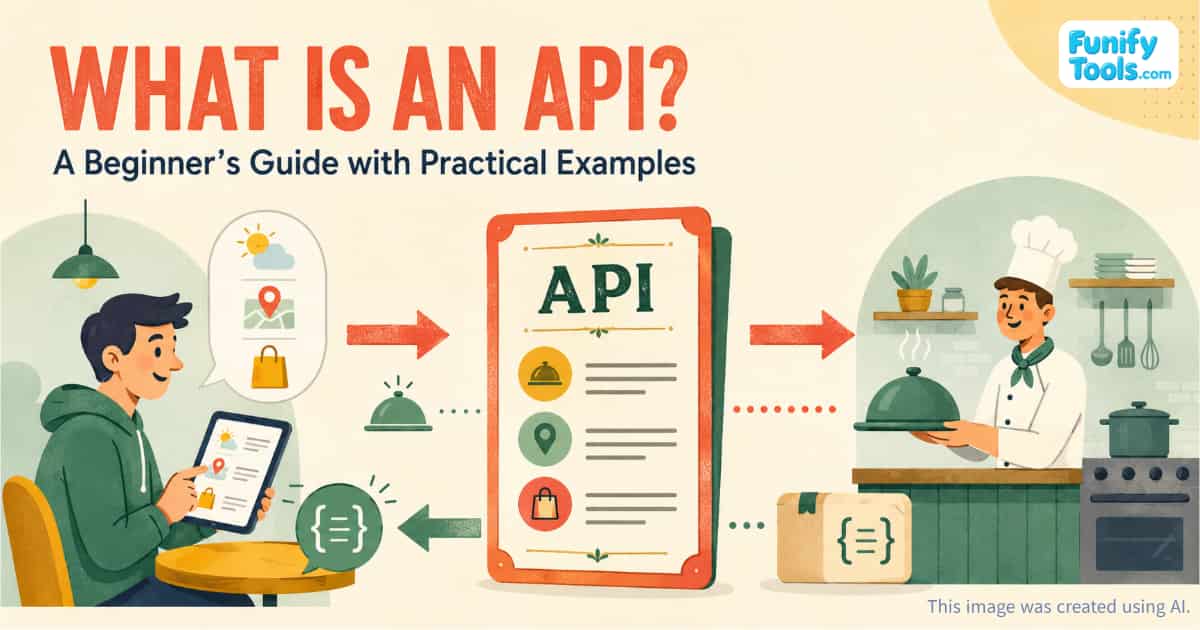
Customers usually cannot enter the kitchen or see exactly how each dish is prepared. Instead, they read the menu, choose an available item, and place an order. The kitchen receives the request, prepares the food, and sends the finished dish back to the customer.
In this example:
- The customer represents a user or another program.
- The kitchen represents the service's internal logic or database.
- The menu represents the API's documentation and rules.
Customers do not need to know the restaurant's secret recipes. They only need to understand what can be ordered and how to place the order.
APIs work in a similar way. A developer does not need to understand all of a service's internal code. As long as the developer knows the correct address, required parameters, authentication method, and response format, another program can communicate with that service.
How Are APIs Used in Real Applications?
A weather app is one of the easiest examples.
The weather app installed on your phone does not directly observe the sky or measure the temperature. Instead, it usually requests information from a weather data provider through an API.
The app may send a request similar to:
Give me the current weather in Seoul.
The server then returns information such as the temperature, humidity, wind speed, and weather conditions. This data is often delivered in a structured format such as JSON.
The app processes the response and presents it as readable text, charts, or weather icons.
Many familiar digital features work in the same way:
- A travel app may use a map API to display locations.
- A website may use a social login API to let users sign in with an existing account.
- An online store may use an API to retrieve product information and inventory data.
- A finance app may use an API to display exchange rates or stock prices.
- A delivery app may use an API to calculate routes and estimated arrival times.
- A payment service may use an API to process online transactions.
APIs allow developers to use existing services instead of building every feature from the beginning.
How Do Developers Use an API?
Developers generally follow a straightforward process when adding an external API to an application.
First, they decide what the application needs to do. For example:
When a user enters an address, I want to find its latitude and longitude.
The developer then looks for an API that provides geocoding functionality. Mapping services such as Google Maps and Kakao Maps offer APIs for this purpose.
The API documentation explains where to send the request, which information must be included, how authentication works, and what kind of response the service returns.
The developer sends an HTTP request from the application according to those instructions. When the API returns data—often in JSON format—the application reads the response and uses it to display the result or perform another action.
That completes the basic flow of using an API:
- Decide what information or function is needed.
- Find an API that provides it.
- Read the API documentation.
- Send a request in the required format.
- Process the response.
- Display the result or use it in the application.
Common API Terms Beginners Should Know
APIs may seem difficult at first because many unfamiliar terms appear at the same time. Words such as endpoint, request, response, header, token, GET, POST, and JSON can make a simple concept sound much more complicated than it really is.
The overall structure becomes easier to understand when it is divided into four questions.
1. Where Should the Request Be Sent?
The request is sent to an API address known as an endpoint.
An endpoint usually represents a specific resource or action. For example, one endpoint might provide current weather information, while another provides a seven-day forecast.
2. What Information Should Be Sent?
The application may need to include parameters or a request body.
For a weather API, the parameters could include a city name, latitude and longitude, preferred language, or temperature unit.
3. How Is the Request Authorized?
Many APIs require an API key, access token, or another authentication method.
This allows the provider to identify who is using the API, control access, apply usage limits, and prevent unauthorized requests.
API keys and tokens should generally be protected rather than exposed publicly in browser code or shared repositories.
4. What Will the API Return?
The API sends back a response. Many modern web APIs return data in JSON format because it is structured, relatively lightweight, and easy for programs to process.
A simplified weather response might look like this:
{
						  "city": "Seoul",
						  "temperature": 27,
						  "condition": "Clear"
						}
The application can then extract these values and present them in a user-friendly format.
GET and POST: What Is the Difference?
Two HTTP methods beginners frequently encounter are GET and POST.
GET is commonly used to retrieve information. A weather app, for example, might use a GET request to obtain the current temperature.
POST is commonly used to send information or create something. A registration form might use a POST request to submit a new user's details to a server.
Other methods include PUT, PATCH, and DELETE, but beginners do not need to memorize all of them immediately. Understanding requests, responses, endpoints, and data formats is a good place to start.
Why Are APIs Important for Collaboration?
APIs make it easier for different developers and teams to work together.
A backend developer might define a rule such as:
If you send a request to this address with these parameters, the server will return product information in this format.
A frontend developer can then use that rule to build the interface and user interactions. The frontend developer does not need to understand the backend's entire codebase, and the backend developer does not need to know every detail of how the interface is built.
Both sides only need to follow the same API specification.
This separation also allows teams to update parts of a service independently. The internal implementation can change without disrupting other applications, provided that the API's agreed behavior remains compatible.
What Makes a Good API?
When developers begin creating their own APIs, clear documentation becomes just as important as the underlying functionality.
Good API documentation should explain:
- Which endpoints are available
- What each endpoint does
- Which inputs are required
- What authentication method is used
- What the response looks like
- Which errors may occur
- What the usage limits are
- Whether example requests are available
Error responses should also be helpful. A message such as “Invalid location” is more useful than a generic “Something went wrong.”
A good API is not simply powerful. It should also be consistent, predictable, and easy for other developers to understand.
How Can Beginners Start Practicing with APIs?
The best way to understand APIs is to use one.
Beginners can start with a simple public API related to weather, exchange rates, countries, or government data. Tools such as a web browser, curl, Postman, or a short JavaScript program can be used to send a request and inspect the response.
A useful first project might be:
- Displaying the current weather for a selected city
- Converting one currency into another
- Searching for information about a country
- Looking up geographic coordinates from an address
- Showing a random quote or fact
Start with a basic request that does not require complicated authentication. Once the request-and-response process feels familiar, you can gradually explore API keys, POST requests, error handling, and more advanced integrations.
Final Thoughts
An API is a set of rules that allows programs and software components to communicate with one another.
The terminology may seem unfamiliar at first, but the core idea is simple: one program sends a properly formatted request, and another system returns a predictable response.
The restaurant-menu analogy can help you remember the basic relationship. You do not need to enter the kitchen or understand every recipe. You only need to know what is available, how to order it, and what kind of result to expect.
Once you understand endpoints, parameters, authentication, and responses, API documentation becomes much less intimidating. From there, experimenting with a simple API is one of the best ways to experience how modern applications exchange data and connect different services.
Thank you for reading, and have a wonderful day!
This article is also available in Korean: Read the Korean version