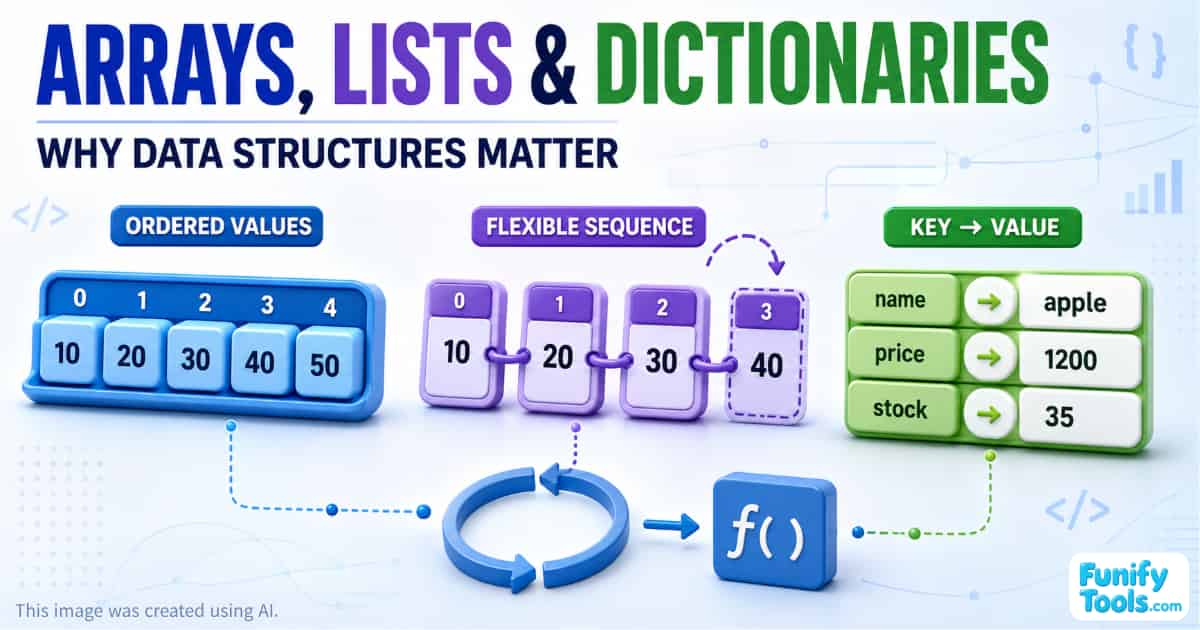
Arrays and lists store multiple values in a specific order.
Dictionaries store values under descriptive labels known as keys.
Arrays and lists are useful when the order of the data matters, while dictionaries are useful when the meaning or attributes of each value matter.
These data structures become particularly powerful when combined with loops, conditional statements, and functions.
As a program grows, the ability to organize related data becomes much more important than simply creating individual variables.
From Organizing Procedures to Organizing Data
In the previous article, we looked at functions.
A function groups a series of instructions under a name so that the same procedure can be used whenever it is needed. This means we do not have to copy and paste the same calculations repeatedly, and future changes can usually be made in one place.
Once we begin building larger programs, however, another problem appears.
This time, the problem is not the number of procedures. It is the amount of data.
Imagine that we need to process the scores of 30 students. If we create a separate variable for every student, we might end up with names such as:
score1 = 82
						score2 = 93
						score3 = 72
The same issue occurs when storing product prices:
price1 = 1200
						price2 = 1800
						price3 = 2400
As the amount of data increases, the number of variable names grows without limit.
Functions may have helped us organize the procedures, but the data itself is still scattered throughout the program.
This is why we need data structures.
What Is a Data Structure?
A data structure is a way of organizing and managing related values.
Programming languages provide many different data structures, but arrays, lists, and dictionaries are among the most common starting points for beginners.
An easy way to understand the difference is:
Functions organize work, while arrays, lists, and dictionaries organize data.
Previously, we compared a function to a microwave oven: once its procedure has been prepared, we can use it repeatedly by providing the necessary input.
This time, imagine a storage cabinet.
If there are only a few objects in a room, we might leave them on the floor and still be able to find them. But once we have clothes, documents, tools, medicine, and charging cables, we need a better system.
We place similar objects together in drawers or attach labels so that they are easier to find, add, and replace.
Programming works in much the same way.
A few values can be handled with individual variables. When the number of values grows, however, we need containers that organize them either by position or by name.
Arrays and lists are like numbered drawers.
Dictionaries are like labeled drawers.
What Are Arrays and Lists?
Arrays and lists store multiple values in a particular order.
Each value has a position, allowing the program to access the first, second, or third item. They are similar to a cabinet whose drawers are identified by numbers.
Suppose we want to store the scores of three students.
Without a list, we might write:
score1 = 82
						score2 = 93
						score3 = 72
With only three values, this may not appear to be a serious problem.
But what if there are 30 students—or 300?
We would need to create more variable names, and calculating the total or average would require us to refer to every variable individually.
As the data grows, this approach quickly becomes difficult to manage.
Instead, we can store the scores together in a list:
scores = [82, 93, 72]
The three values are no longer scattered across separate variables. They now belong to one collection named scores.
Even if the number of values increases, we only need to remember the name of the list.
Lists Work Naturally with Loops
Once values have been placed in a list, we can use a loop to process them one by one.
scores = [82, 93, 72]
						total = 0

						for score in scores:
						    total = total + score

						average = total / len(scores)
						print("Average:", average)
The loop takes each value from scores and adds it to total.
The important point is that the basic structure of the code does not change significantly whether the list contains three scores or 300. We can add more data without creating hundreds of new variables or additional lines of calculation.
That is one of the most important ideas in programming.
Programming skill is not measured by how much complicated code we can write. Good code can usually handle more data without requiring major structural changes.
Arrays and lists help create that scalability.
Are Arrays and Lists the Same Thing?
At a beginner level, arrays and lists can both be understood as ordered collections of values.
However, the exact distinction depends on the programming language.
An array usually has a fixed or more strictly managed size and often stores values of the same data type. A list is generally more flexible and may be able to grow or shrink dynamically.
For example, Python's built-in list can change length and can technically contain values of different types. Arrays in languages such as C or Java usually have a fixed size and a defined element type.
Other languages may use the terms differently or provide several collection types with different performance characteristics.
For now, the most important shared concept is this:
An array or list is an ordered collection whose values can be accessed by position.
The finer distinctions will become more meaningful as you learn about memory, data types, performance, and the features of a particular language.
Understanding the Index
The position of a value in an array or list is known as its index.
One detail often surprises beginners: in many programming languages, the first item has an index of 0, not 1.
scores = [82, 93, 72]

						print(scores[0])  # 82
						print(scores[1])  # 93
						print(scores[2])  # 72
The list contains three values, but their indices are 0, 1, and 2.
We can think of an index as the numbered location where an item is stored.
This makes arrays and lists particularly useful when position and order matter.
Examples include:
- Student scores
- Recently visited pages
- Items in a shopping cart
- Hourly temperature readings
- Steps in a process
- Songs in a playlist
- Messages in a conversation
- Coordinates in a path
What Is a Dictionary?
If a list is a cabinet with numbered drawers, a dictionary is a cabinet with labeled drawers.
In a list, we retrieve a value according to its position. In a dictionary, we retrieve it using a descriptive key.
Some data is much easier to understand by meaning than by order.
Imagine that we want to store information about a product. It has a name, price, and quantity in stock.
We could place those values in a list:
product = ["apple", 1200, 35]
The data has been stored, but it is not immediately clear what each position means.
We must remember that:
- Position 0 contains the product name.
- Position 1 contains the price.
- Position 2 contains the quantity in stock.
The structure might make sense while we are writing it, but it can become confusing later—or to someone reading the code for the first time.
A dictionary makes the meaning explicit:
product = {
						    "name": "apple",
						    "price": 1200,
						    "stock": 35
						}
Each value now has a label:
-
"name"identifies the product name. -
"price"identifies the price. -
"stock"identifies the available quantity.
We no longer need to memorize a numeric position.
print(product["name"])
						print(product["price"])
A dictionary resembles an address book.
When we want to find someone's phone number, we do not normally memorize whether the person appears on the first, second, or twentieth line. We search using the person's name.
In the same way, dictionaries allow a program to locate values by meaningful keys.
Keys and Values
A dictionary stores data as pairs consisting of a key and a value.
user = {
						    "name": "Alex",
						    "age": 25,
						    "city": "Seoul"
						}
Here:
-
"name"is a key, and"Alex"is its value. -
"age"is a key, and25is its value. -
"city"is a key, and"Seoul"is its value.
Keys must be unique within the same dictionary. If we assign another value to an existing key, the previous value is normally replaced.
user["age"] = 26
We can also add a new key-value pair:
user["email"] = "[email protected]"
Dictionaries are particularly useful for:
- User profiles
- Product information
- Application settings
- Address books
- Configuration values
- API responses
- Records retrieved from databases
In all these examples, the meaning of each field is more important than its numeric position.
Lists and Dictionaries Solve Different Problems
The basic difference can be summarized as follows.
Use an array or list when:
- The order of the values matters.
- You want to process items from beginning to end.
- Each item plays a similar role.
- You need to access values by position.
Use a dictionary when:
- Each value has a distinct meaning.
- Descriptive field names make the data easier to understand.
- You want to retrieve values by key.
- You are representing the attributes of a single object.
Neither structure is universally better. The right choice depends on the shape and purpose of the data.
Lists and Dictionaries Are Often Used Together
Real programs rarely use these structures entirely on their own.
Consider the products in an online store.
There are multiple products, so the complete collection can be represented as a list. Each product has several attributes—including a name, price, stock quantity, and category—so an individual product can be represented as a dictionary.
The resulting structure is a list containing several dictionaries:
products = [
						    {
						        "name": "apple",
						        "price": 1200,
						        "stock": 35
						    },
						    {
						        "name": "banana",
						        "price": 1800,
						        "stock": 20
						    },
						    {
						        "name": "orange",
						        "price": 2400,
						        "stock": 12
						    }
						]
This type of structure appears constantly in real software.
The reason is simple: real-world data often consists of multiple objects, and each object has multiple attributes.
The same pattern can represent:
- A list of students
- A list of users
- A list of blog posts
- A list of orders
- A list of files
- A list of messages
- A list of products
The outer list answers the question, “How many objects are there, and in what order?”
Each inner dictionary answers the question, “What information belongs to this object?”
Combining Data Structures with Functions and Loops
This is where the functions and loops covered in earlier lessons become important again.
A loop can process every item in a list.
A dictionary allows us to select the attribute we need from each item.
A function can package the complete procedure so that it can be used again.
Suppose we want to calculate the sum of the product prices:
products = [
						    {
						        "name": "apple",
						        "price": 1200,
						        "stock": 35
						    },
						    {
						        "name": "banana",
						        "price": 1800,
						        "stock": 20
						    },
						    {
						        "name": "orange",
						        "price": 2400,
						        "stock": 12
						    }
						]

						def total_price(items):
						    total = 0

						    for item in items:
						        total = total + item["price"]

						    return total

						print("Total:", total_price(products))
This example brings together several concepts:
-
productsis a collection of data. -
The
forloop examines each product in order. -
item["price"]retrieves one attribute from a dictionary. -
totalis a variable that stores an intermediate result. -
total_price()groups the entire procedure into a reusable function.
Programming is not about memorizing individual concepts in isolation. It is about understanding how those concepts work together.
How the Basic Programming Concepts Connect
Constants and variables are the basic units used to store individual values.
Conditional statements allow a program to follow different paths depending on the situation.
Loops allow the same operation to be performed repeatedly.
Functions organize procedures so that they can be reused.
Arrays, lists, and dictionaries organize the data that those procedures process.
We can summarize the relationship like this:
Variables store individual values.
						Conditions make decisions.
						Loops repeat operations.
						Functions organize procedures.
						Data structures organize collections of values.
Once these concepts are combined, programs become capable of handling much larger and more realistic problems.
Why Data Structure Design Matters
As a program grows, handling a single value correctly is no longer enough.
We must also decide how related values should be grouped.
A good data structure can:
- Make code easier to read
- Reduce repetitive variables
- Work naturally with loops
- Make functions more reusable
- Simplify future changes
- Allow the program to handle larger amounts of data
- Make the meaning of the data clearer
- Reduce the chance of mistakes
Without arrays, lists, or dictionaries, every new piece of data might require another variable and another section of processing code.
With data structures, the amount of data can increase while the basic structure of the program remains largely unchanged.
That is a central principle of automation and scalability.
A More Practical Example
Suppose we want to find every product that is currently in stock.
products = [
						    {
						        "name": "apple",
						        "price": 1200,
						        "stock": 35
						    },
						    {
						        "name": "banana",
						        "price": 1800,
						        "stock": 0
						    },
						    {
						        "name": "orange",
						        "price": 2400,
						        "stock": 12
						    }
						]

						for product in products:
						    if product["stock"] > 0:
						        print(product["name"], "is available.")
This example combines:
- A list
- Dictionaries
- A loop
- A conditional statement
The loop examines every product. The condition checks its stock quantity. The dictionary key identifies the exact value we need.
If the store later adds 1,000 more products, the processing logic does not need to be rewritten. We only need to add or load more product data.
That is the power of designing data as a collection.
Data Structures Reflect the Real World
Nearly every useful program stores, retrieves, changes, and repeatedly processes large amounts of data.
A school system manages students, classes, grades, and attendance.
An online store manages products, customers, carts, and orders.
A social media service manages users, posts, comments, and messages.
A weather application manages locations, times, temperatures, and forecasts.
These are not isolated values. They are collections of related objects and attributes.
Arrays, lists, and dictionaries provide the basic tools needed to represent those relationships in code.
What Comes Next?
Arrays, lists, and dictionaries are only the beginning of data structures.
There are many related concepts to learn next, including:
- Indices
- Duplicate dictionary keys
- Nested lists
- Nested dictionaries
- Sorting
- Searching
- Adding and removing values
- Sets
- Tuples
- Stacks
- Queues
- Trees
- Graphs
Beginners do not need to memorize everything at once.
It is more effective to understand the broad purpose of each structure and then build small programs that use them. Programming is learned more effectively through direct practice than by reading definitions alone.
Try creating:
- A list of test scores
- A dictionary describing one student
- A list containing several student dictionaries
- A loop that calculates an average
- A function that searches for a student by name
Small experiments like these help turn an abstract concept into something practical.
Final Summary
Arrays and lists store multiple values in an ordered collection.
Dictionaries store values under descriptive keys.
Lists are useful when position and sequence matter.
Dictionaries are useful when the meaning and attributes of the values matter.
Real programs frequently combine them by placing several dictionaries inside a list.
When these structures are used with loops, conditions, and functions, a program can process far more data without becoming unnecessarily complicated.
The larger a program becomes, the more important it is to design collections of data effectively rather than continuing to create individual variables.
Arrays, lists, and dictionaries are the starting point for learning how real programs organize and manage information.
Thank you for reading. I hope this article helps you take the next step in your programming journey.
This article is also available in Korean: Read the Korean version