10-second lesson
- The web is mostly stateless, which means a website does not automatically remember you between separate page requests.
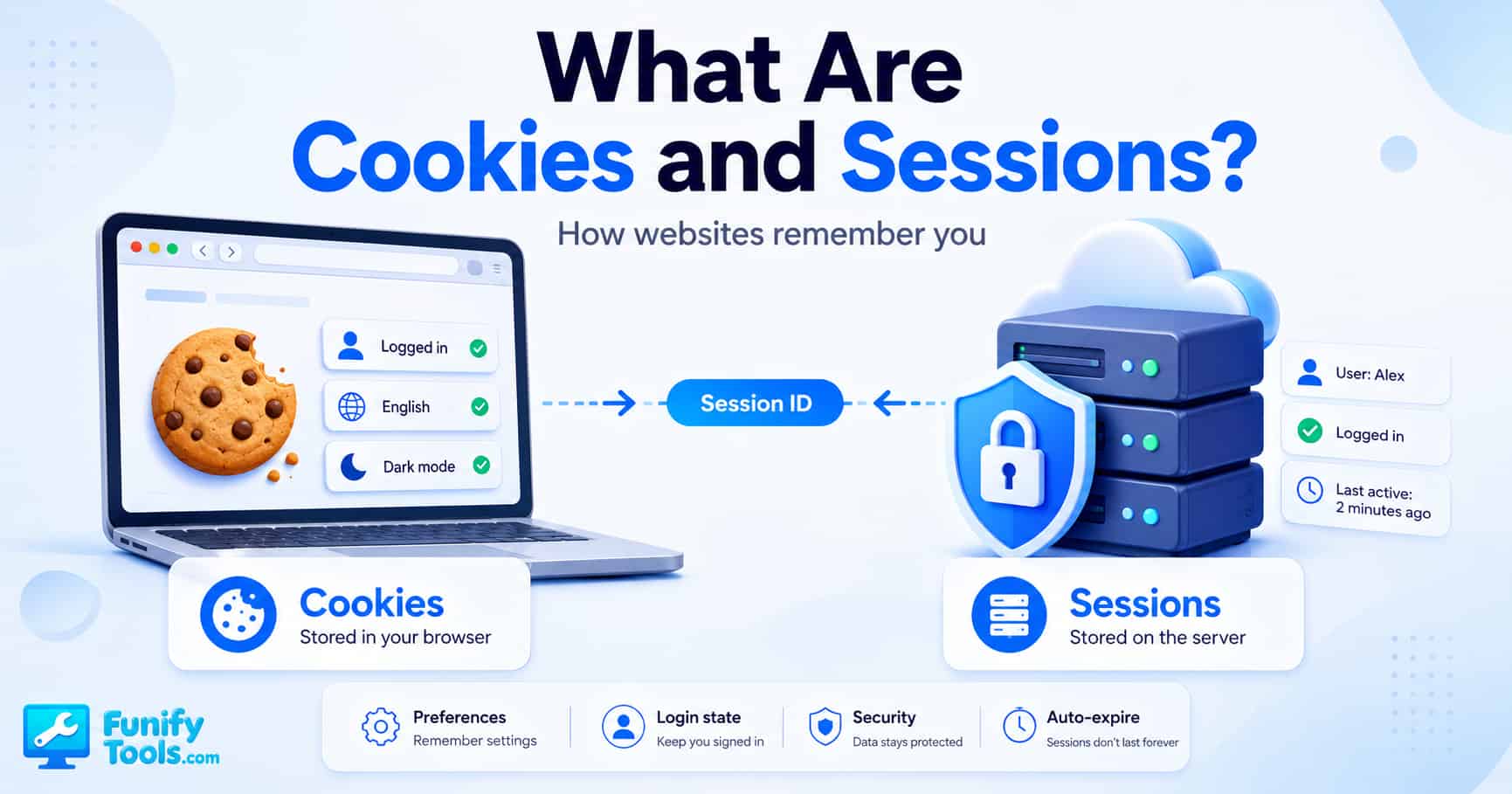
- Cookies are small pieces of data stored in your browser, often used for preferences, login hints, tracking choices, and simple remembered settings.
- Sessions are stored on the server and are commonly used to keep track of your logged-in state while you use a website.
- A session usually works by giving your browser a session ID, which is often stored inside a cookie and sent back with each request.
- Cookies live on the user’s device, while session data usually lives on the website’s server.
- Cookies can last for minutes, days, months, or longer, depending on how the website sets them.
- Sessions usually expire after a timeout, when you log out, or when the server decides the login state is no longer valid.
- In plain English, cookies help the browser remember small things, while sessions help the server remember who you are.
A Closer Look at Cookies and Sessions
Cookies and sessions are two of the main reasons the web feels like it remembers you. Without them, using a website would be annoying in a very old-school way. You could log in, move to the next page, and the site might immediately forget who you are. You could set dark mode, refresh the page, and the site might go right back to the default theme. You could add something to a shopping cart, click another product, and the cart might disappear.
That sounds broken, but it comes from a basic design of the web. A website does not keep a natural ongoing connection with your browser the same way a phone call stays open between two people. Most web pages work through separate requests. Your browser asks for a page, the server sends a response, and that request is done. Then you click something else, and your browser sends another request. To the server, that next request needs some way to prove it belongs to the same person, same browser, or same visit.
This is where cookies and sessions come in. They are not the same thing, even though people often mix them together. A cookie is data stored by the browser. A session is usually data stored by the server. In many real websites, the two work as a pair: the server stores the actual session data, and the browser stores a small cookie containing a session ID. That session ID acts like a claim ticket. The browser shows the ticket, and the server uses it to find the matching session.
Once you understand that simple relationship, a lot of web behavior starts to make sense. Staying logged in, remembering your language, keeping a cart alive, showing the right account page, limiting repeated form submissions, and restoring some preferences all depend on some version of this idea: the website needs a safe way to connect separate requests into one meaningful user experience.
Why Websites Need Memory in the First Place
The web is built around requests and responses. You type a URL, click a button, submit a form, or load an image. Your browser sends a request to a server. The server sends something back. That might be HTML, CSS, JavaScript, an image, a JSON response, or some other file. Once the server sends the response, that request is basically finished.
This design is efficient and flexible, but it creates a problem. Real users do not think in isolated requests. People think in sessions. You log in and expect the site to keep treating you as logged in. You add an item to your cart and expect the cart to still be there. You choose English instead of another language and expect the site to remember. You dismiss a banner and do not want it popping back up every five seconds.
Without a memory mechanism, the server would have no reliable way to know whether two requests came from the same person. It might see one request for the login page, another request for the account page, and another request for the settings page, but it would need some kind of identifier to connect them. Cookies and sessions provide that bridge.
It helps to think of the web like a busy front desk. Every time you walk up, the person at the desk needs to know whether you are a new visitor, a returning visitor, or someone who already checked in. A cookie is like a small note you carry with you. A session is like the file the front desk keeps behind the counter. The note alone may not contain everything, but it helps the desk find the right file.
What a Cookie Actually Is
A cookie is a small piece of text that a website asks your browser to store. Later, when your browser visits the same site again, it can send that cookie back with the request. The cookie might contain a simple preference, a tracking value, a consent choice, or an identifier that points to information stored somewhere else.
For example, a site might store a cookie that says you prefer dark mode. The next time you load the page, the site can read that cookie and apply the dark theme automatically. Another site might store a cookie that says your preferred language is English. A shop might use a cookie to connect your browser to a cart. A login system might use a cookie to hold a session ID so the server knows which account session belongs to you.
Cookies are usually tiny. They are not meant to store huge files, large documents, or full user profiles. They are better suited for compact values: IDs, flags, preferences, short tokens, and small pieces of state. Because cookies are automatically included in matching requests, they are useful for website behavior that needs to stay consistent as you move between pages.
The important point is that cookies live in the browser. They are stored on the user’s side, not only on the website’s server. That makes them convenient, but it also means they need to be handled carefully. A badly designed cookie can create privacy issues, security problems, or confusing behavior when the user clears browser data or switches devices.
What a Session Actually Is
A session is the website’s way of remembering a temporary interaction with a user. In most common web applications, session data is stored on the server. It might contain information like “this user is logged in,” “this is user account 12345,” “this cart belongs to this visitor,” or “this person passed two-factor authentication a few minutes ago.”
The server does not usually send all of that session data to the browser. Instead, it sends a session ID. The browser stores that ID, often inside a cookie. On the next request, the browser sends the session ID back. The server looks up that ID and finds the matching session data. That is how the server knows the request is part of the same logged-in visit.
This is safer than putting all sensitive account data directly inside a browser cookie. If the server keeps the important details, it can also destroy or expire the session whenever needed. When you click “Log out,” the server can invalidate the session. When too much time passes, the server can expire it. If suspicious activity is detected, the server can reject the session and ask the user to log in again.
That is why sessions are so common for authentication. The browser may only hold an ID, but the server holds the actual meaning of that ID. In plain English, the cookie says, “Here is my ticket,” and the server says, “Let me check what this ticket is allowed to do.”
Cookies vs. Sessions in One Simple Example
Imagine you visit an online store. Before logging in, you add a pair of headphones to your cart. The site might use a cookie to remember that this browser has a temporary cart. Then you create an account and log in. At that point, the server creates a session so it can treat your next requests as coming from a logged-in user.
The browser receives a cookie containing a session ID. You click the account page. Your browser sends the session ID cookie. The server checks the ID, finds your session, and says, “Yes, this person is logged in.” Then you go to checkout. Again, your browser sends the same session ID. The server connects that request to your account and cart.
From your point of view, everything feels continuous. You logged in once, moved around the site, and the site remembered you. Behind the scenes, every page request still had to prove itself. Cookies and sessions made that possible.
This is also why logging out matters. When you log out, the server can destroy the session or mark it as invalid. The browser may still have an old cookie for a moment, but if the server no longer accepts that session ID, the login state is gone. That is why a secure website should not rely only on deleting a browser-side value. The server-side session also needs to be handled properly.
Persistent Cookies and Session Cookies
Not all cookies last the same amount of time. Some cookies are temporary. Some cookies remain for a long time. This is one reason people get confused when they hear the word “session” in different contexts.
A session cookie is a cookie that is meant to last only for the current browser session. In many cases, it disappears when the browser closes, although modern browsers can restore sessions in ways that make this behavior feel less clear. A persistent cookie has an expiration date or maximum age. It can stay in the browser after closing and reopening the app.
A website might use a persistent cookie to remember your language or consent settings. It might also use a longer-lived cookie for a “remember me” login feature. That does not always mean the site keeps your full login session active forever. A well-designed site can use a longer-lived token to help create a new session after additional checks.
The key idea is that cookie lifetime is controlled by how the cookie is set. Some cookies are short-lived. Some are long-lived. Some are deleted when you log out. Some stay around to remember non-sensitive settings. When users clear browser data, those cookies can disappear, which is why a website may forget preferences or require login again.
Why Cookies Are Not Always About Login
Cookies are often discussed in the context of login, but that is only one use case. Many cookies have nothing to do with authentication. A cookie can remember that you selected dark mode, chose a region, accepted a cookie banner, changed font size, or dismissed a notice. These cookies are usually about convenience.
Cookies can also be used for analytics. A site may want to know whether today’s visitor is new or returning, which pages people visit, or whether a feature is being used. Depending on the setup, this can be done in more privacy-friendly or less privacy-friendly ways. That is why cookie consent banners became common in many regions. People want more control over how browsing behavior is tracked.
Advertising cookies are another category. These can be used to recognize a browser across different websites, build interest profiles, measure ad performance, or limit how often the same ad appears. This is the side of cookies that tends to make people uncomfortable, because it can feel like the browser is being followed around the internet.
So when someone says “cookies are bad,” that is too simple. Cookies are just a browser mechanism. Some are necessary for basic site functionality. Some are helpful for preferences. Some are used for analytics. Some are used for advertising and tracking. The privacy impact depends on what the cookie stores, who can read it, how long it lasts, and how it is used.
First-Party and Third-Party Cookies
A first-party cookie is set by the website you are actually visiting. If you are on example.com and example.com sets a cookie, that is first-party. These cookies are often used for login, settings, carts, and direct site features.
A third-party cookie is set by a different domain embedded inside the page. For example, a page might include an ad network, analytics script, social media widget, or external media player. If that outside service sets a cookie from its own domain, that cookie is considered third-party in that context.
Third-party cookies became controversial because they can be used to track browsing behavior across many unrelated sites. If the same advertising domain appears on thousands of websites, it may be able to recognize the same browser as it moves around. That is useful for ad targeting, but it raises obvious privacy concerns.
Many browsers and privacy tools now limit third-party cookies or give users more control over them. This does not mean cookies are gone. It means the web is slowly moving toward more restricted tracking behavior and more careful handling of cross-site identity. Functional first-party cookies are still widely used because websites still need a way to remember basic state.
What Is Inside a Cookie?
A cookie usually has a name and a value. It can also have settings that control where it is sent, how long it lasts, and how the browser should protect it. These settings are not just technical trivia. They affect security and privacy in real ways.
The domain and path decide which requests should include the cookie. The expiration or max-age decides how long the cookie remains. The Secure attribute tells the browser to send the cookie only over HTTPS. The HttpOnly attribute prevents JavaScript from reading the cookie directly, which can reduce damage from certain script-based attacks. The SameSite attribute helps control whether the cookie is sent with cross-site requests.
For a normal user, you do not need to memorize all of those details. But it is useful to know that cookies are not just random text blobs. They come with rules. A serious website should set sensitive cookies carefully, especially cookies related to login sessions.
For developers, those cookie attributes matter a lot. A login cookie without proper protection can become a weak point. A cookie sent over an insecure connection can be exposed. A cookie accessible to JavaScript may be easier to steal if the site has a cross-site scripting problem. A cookie with careless cross-site behavior may increase the risk of request forgery. Small settings can have big consequences.
Session IDs: The Small Value With a Big Job
The session ID is one of the most important parts of the whole system. It is usually a random-looking value that identifies a session on the server. The browser does not need to understand it. It just stores it and sends it back. The server is the one that knows what it means.
A good session ID should be hard to guess. If an attacker can guess someone else’s session ID, they may be able to pretend to be that user. That is why session IDs need enough randomness and should be generated securely. They should not be based on obvious patterns like user IDs, timestamps, or simple counters.
Session IDs should also be rotated at important moments. For example, after login, a website may generate a fresh session ID to reduce the risk of session fixation. After privilege changes, password updates, or sensitive security events, changing session identifiers can be a smart defensive move.
To users, the session ID is invisible most of the time. You do not see it unless you open developer tools or inspect browser storage. But it is doing a lot of work. It is the little ticket that connects your browser to your server-side state.
Why Sessions Expire
Session expiration can be annoying, especially when you are halfway through a form and the site asks you to log in again. But expiration exists for a reason. A session that lasts forever is risky. If someone else gets access to the browser, steals the session ID, or uses an old device you forgot about, a never-ending session becomes a security problem.
Most websites use some kind of timeout. An idle timeout ends the session after no activity for a while. An absolute timeout ends the session after a fixed period, even if there was activity. Some services use shorter timeouts for sensitive areas, such as banking, account settings, admin panels, or payment screens.
Good session design balances convenience and safety. A casual news site may keep you signed in for a long time. A banking site should be stricter. A work dashboard with sensitive company data may require re-authentication more often. The right choice depends on what the account can access and what damage could happen if the session is abused.
This is also why “remember me” should be treated carefully. It is convenient, but it should not mean the website ignores all security. A safer design may use a longer-lived token with extra checks instead of keeping the same powerful session alive forever.
What Happens When You Clear Cookies?
When you clear cookies, many websites forget local browser state. You may be logged out. Your language setting may reset. Shopping carts may disappear. Cookie banners may show up again. Dark mode may turn off. Analytics systems may treat you like a new visitor.
This does not always delete your account or server-side data. If your account exists on the server, clearing cookies does not erase it. It simply removes the browser’s local values that help the website recognize the browser. When you log in again, the server can create a new session and send a new cookie.
That distinction matters. Cookies are not the same as your account. They are more like browser-side notes and identifiers. Deleting them can break the connection between your browser and the website’s remembered state, but it does not necessarily delete the underlying data stored by the service.
It also explains why switching browsers or devices may make a website act like it does not know you. Your laptop browser, phone browser, and tablet browser each have their own cookie storage. Unless the website syncs your settings through your account, each browser may need its own cookie or session.
Cookies, Local Storage, and Browser Storage
Cookies are not the only way a browser can store data. Modern websites can also use localStorage, sessionStorage, IndexedDB, and other browser storage tools. These tools are often used for app settings, cached data, draft content, offline behavior, or larger client-side data.
The big practical difference is that cookies are automatically sent with matching HTTP requests, while localStorage is not. If a site stores something in localStorage, JavaScript can read it and use it inside the page, but the browser does not automatically attach it to every request the same way it does with cookies.
This makes cookies especially useful for server-side authentication and request-based state. The server can receive the cookie with each request and look up the session. Other browser storage tools can be useful too, but they are not a drop-in replacement for every cookie use case.
For sensitive login data, developers need to be careful with any browser storage choice. Storing powerful tokens where JavaScript can easily read them can create risk if the site has a script injection vulnerability. Security is not just about where data is stored; it is about how it is protected, how long it lasts, and what an attacker could do with it.
Are Cookies Dangerous?
Cookies are not automatically dangerous. A cookie that remembers dark mode is not scary. A cookie that stores a random session ID over HTTPS with proper protections is a normal part of secure web design. A cookie that records consent preferences can be useful. The risk comes from what the cookie represents and how it is handled.
A stolen session cookie can be serious because it may allow someone to act as the logged-in user. That is why secure sites use HTTPS, HttpOnly cookies, SameSite protections, session expiration, suspicious activity checks, and logout controls. The cookie itself might only be a small ID, but that ID can unlock a server-side session.
Privacy is a separate concern. Tracking cookies can be used to build a picture of browsing behavior. Even if that does not directly expose a password, it can still feel invasive. That is why browser privacy settings, consent tools, and tracking protection features matter.
For regular users, the practical advice is simple. Use browsers with good security updates. Be careful on shared computers. Log out of sensitive accounts when needed. Do not ignore HTTPS warnings. Clear cookies when troubleshooting or when you want to remove remembered site state. And understand that blocking all cookies can break some websites, especially sites that need login or carts.
Why Websites Ask You to Accept Cookies
Cookie consent banners exist because many websites use cookies or similar technologies for analytics, personalization, advertising, or other tracking-related purposes. Laws and privacy rules in different regions may require websites to explain what they use and give users choices.
Not every cookie requires the same level of concern. A strictly necessary cookie used to keep you logged in or remember a shopping cart is different from an advertising cookie used across multiple websites. Good consent interfaces explain categories clearly instead of treating every cookie as the same thing.
Unfortunately, some banners are confusing, annoying, or designed to push users toward accepting everything. That is a user experience problem. A better design lets people accept necessary functionality, reject non-essential tracking, and understand what they are choosing without reading a legal novel.
From a website owner’s point of view, cookie notices should not be treated as decoration. They should match the site’s real behavior. If a site uses analytics, ads, embedded services, or third-party tools, the cookie and privacy messaging should be honest and understandable.
Common Login Flow Using Cookies and Sessions
A typical login flow starts when you enter your username and password. The browser sends that information to the server over HTTPS. The server checks whether the credentials are valid. If they are valid, the server creates a session. That session might store your user ID, login time, permission level, and security status.
Then the server sends a response that includes a Set-Cookie header. That header tells the browser to store a session cookie. The cookie does not need to contain your password. It usually contains a session ID or token. On future requests, the browser sends the cookie back automatically.
When you open your profile page, the server reads the session ID from the cookie, finds the matching session, checks whether it is still valid, and then returns your account page. If the session is expired, missing, invalid, or suspicious, the server sends you back to the login page.
This is why the login state can disappear when cookies are blocked. If the browser refuses to store or send the session cookie, the server may not be able to connect your requests to the session. The site may keep acting like you are not logged in, even if your password was correct.
Why “Remember Me” Is Different From a Normal Session
A normal session is often designed to be temporary. It may last until the browser closes, until a timeout, or until logout. A “remember me” feature is designed to survive longer. It lets the site recognize you after returning later, sometimes even after closing the browser.
There are different ways to build this. A careless design might simply keep a session alive for a very long time. A better design often uses a separate long-lived remember token that can create a new session after validation. That token should be stored carefully, rotated when used, and invalidated when the user logs out or changes security settings.
From the user side, “remember me” is convenient on your own trusted device. It is not a great idea on a public computer, shared office machine, hotel lobby computer, or someone else’s device. If you check that box in the wrong place, the next person using the machine may have a chance to access your account.
That is why many services separate “stay signed in” from more sensitive actions. You might remain logged in for browsing, but still need to re-enter your password before changing account email, viewing payment details, or deleting data.
How Developers Think About Cookie Security
For developers, cookies and sessions are not just beginner web concepts. They are part of real security architecture. A small mistake can create a large vulnerability. That is why secure defaults matter.
A sensitive cookie should usually be sent only over HTTPS. It should often use HttpOnly so scripts cannot read it directly. It should use SameSite settings that match the application’s needs. It should have a reasonable lifetime. The session ID should be random and unguessable. The server should validate the session on every important request.
Servers should also handle logout properly. Logging out should invalidate the server-side session, not just remove something from the page visually. Password changes, suspicious login attempts, role changes, and account recovery flows may need to invalidate old sessions as well.
Developers also need to avoid storing sensitive information directly inside cookies unless they truly know what they are doing. Putting raw passwords, private user data, or permission flags in an easily readable cookie is a bad idea. Even signed or encrypted cookies need thoughtful design. The simplest safe pattern for many apps is still this: keep sensitive state on the server and give the browser only a protected identifier.
Common Misunderstandings
One common misunderstanding is that cookies and sessions are opposites. They are not really opposites. They are different tools, and they often work together. The browser may store a cookie, and that cookie may point to a session on the server.
Another misunderstanding is that clearing cookies deletes everything a website knows about you. It usually does not. The website may still have your account, order history, saved files, or profile data on the server. Clearing cookies mostly removes local browser state and identifiers.
People also sometimes think sessions are always safer than cookies. That is too simple. A server-side session can be safer because sensitive data stays on the server, but the session ID still has to travel through the browser. If that ID is stolen, poorly protected, or never expires, the session can still be abused.
Finally, some people assume cookies are only for tracking. They are not. Many cookies are required for basic web features. Blocking every cookie can make logins, carts, preferences, and dashboards stop working. The better question is not “Are cookies good or bad?” The better question is “What is this cookie used for, who can access it, and how long does it last?”
Cookies and Sessions in Everyday Language
If the technical terms still feel fuzzy, use this mental model. A cookie is something your browser keeps. A session is something the server keeps. A session ID is the small value that connects the two.
When a site remembers your theme, that might be a simple cookie. When a site keeps you logged in as you move between pages, that is usually a session connected by a cookie. When a site remembers you next week, that may involve a persistent cookie or a remember-me token. When a site forgets you after clearing browser data, it is often because the cookie holding the identifier is gone.
That is the practical difference. Cookies are browser-side memory. Sessions are server-side memory. The two work together to make a stateless web feel personal, continuous, and usable.
You do not need to inspect every cookie in developer tools to understand the basic idea. Just remember this: the browser needs a way to say “I am the same visitor as before,” and the server needs a way to look up what that visitor is allowed to do. Cookies and sessions solve that problem together.
So, What Should You Remember?
Cookies and sessions are not mysterious once you strip away the jargon. A cookie is a small browser-stored value. A session is a server-stored state. A session ID is the bridge between them. Together, they help websites remember logins, preferences, carts, and user activity across separate page requests.
For users, the main takeaway is that cookies are part of normal web browsing, but not all cookies serve the same purpose. Some are necessary, some are convenient, and some are used for tracking. Clearing cookies can help with privacy or troubleshooting, but it can also log you out and reset site preferences.
For developers and site owners, the takeaway is that cookies and sessions need careful handling. Login cookies should be protected. Session IDs should be secure. Session expiration should be reasonable. Sensitive data should not be casually stored in browser-readable cookies. Privacy messaging should be honest.
The web may be stateless by default, but users expect websites to remember what matters. Cookies and sessions are the quiet machinery behind that experience. They are why a website can greet you by name, keep your cart alive, remember your settings, and still separate your account from everyone else’s. Used well, they make the web feel smooth. Used badly, they can create security and privacy headaches. Understanding the difference is one of the easiest ways to understand how modern websites really work.
This article is also available in Korean: Read the Korean version