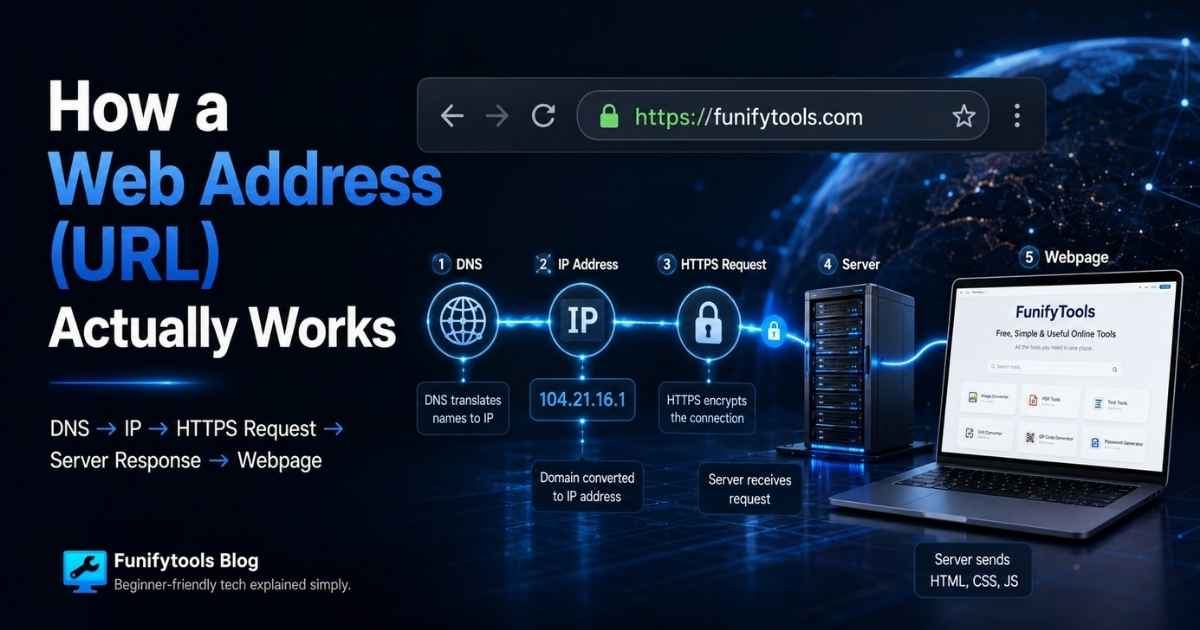
10-second lesson
- A URL is the web address you type into a browser, such as
https://funifytools.com/posts. - The domain name, like
funifytools.com, is easy for people to read, but computers need an IP address to find the server. - DNS works like the internet's address book, translating the domain name into the server's numerical address.
- After DNS finds the address, your browser connects to the server and asks for a specific page, image, file, or resource.
https://means the browser and server use encryption so other people cannot easily read the data in between.- The server sends back HTML, CSS, JavaScript, images, and other files, along with a status code like
200 OKor404 Not Found. - Your browser reads those files, builds the page structure, applies the design, runs scripts, and shows the finished webpage.
- So a simple web address starts a fast chain reaction: DNS lookup, secure connection, request, response, and page rendering.
How a URL Turns Into a Webpage
A web address looks simple because we use it every day. You type something like https://funifytools.com, press Enter, and a page appears. But that short line of text is not just a name. It is a set of instructions that tells your browser where to go, how to connect, and what to ask for.
The technical name for a web address is a URL, which stands for Uniform Resource Locator. In plain English, a URL is a locator for something on the web. That something might be a homepage, a blog post, an image, a PDF, a video file, or an API endpoint. The URL tells the browser, "Go to this place and request this resource."
The Main Parts of a URL
Take this example: https://funifytools.com/posts/posts-main. The first part, https://, is the protocol. It tells the browser which rules to use when talking to the server. Today, most websites use HTTPS because it encrypts the connection between your browser and the website.
The next part, funifytools.com, is the domain name. This is the human-friendly name of the website. People are good at remembering names, but computers on the internet do not truly route traffic by names. They route it by IP addresses, which are numerical addresses assigned to machines and networks.
The last part, /posts/posts-main, is the path. The path tells the server which page or resource you want after you have reached the right website. You can think of the domain as the building address and the path as the room, shelf, or file inside that building.
Why DNS Is Needed
When you type a domain name, your browser needs to find the server behind that name. This is where DNS comes in. DNS stands for Domain Name System. A common comparison is that DNS is like the internet's phonebook, but an address book is probably even closer. You give it a readable name, and it finds the technical address your computer needs.
Your browser may already know the answer because it has cached a recent DNS result. If not, your computer asks a DNS resolver. That resolver may be provided by your internet company, your router, Google, Cloudflare, or another DNS service. The resolver follows the DNS chain until it finds the authoritative answer for the domain.
Once DNS returns the IP address, your browser knows which server to contact. This step usually happens so quickly that you never notice it. Still, without DNS, browsing would be much harder. Instead of typing friendly names, you would need to remember long numbers for every website you visit.
The Browser Connects to the Server
After the browser has the IP address, it opens a connection to the server. If the URL starts with HTTPS, the browser and server also perform a security handshake. During that handshake, they agree on how to encrypt the conversation and the browser checks that the site has a valid certificate for the domain.
This is why the lock icon in the address bar matters. It does not mean the website is automatically honest, perfect, or safe in every possible way. It means the connection is encrypted and the browser has verified that it is talking to a server that can prove it represents that domain.
Once the secure connection is ready, the browser sends an HTTP request. A request is basically the browser saying, "Please send me this page." The request can include the path, the browser type, cookies, language preferences, and other details the server may need to respond correctly.
The Server Sends a Response
The server then prepares a response. If everything works, it sends back a status code such as 200 OK and the content for the page. If the page does not exist, the server may return 404 Not Found. If something goes wrong on the server, you might see a 500 error.
The first response is often an HTML document. HTML gives the browser the structure of the page: headings, paragraphs, links, images, buttons, lists, and sections. But HTML is usually only the beginning. The page may also point to CSS files for styling, JavaScript files for behavior, fonts, images, analytics scripts, and other resources.
The browser reads the HTML, discovers those extra resources, and makes more requests for them. That is why one webpage can trigger dozens of network requests. What feels like one page load is often a coordinated collection of many smaller downloads.
How the Page Appears on Screen
After the browser receives the files, it starts building the page. It parses the HTML into a document structure, applies CSS rules to decide layout and appearance, loads images and fonts, and runs JavaScript when needed. Finally, it paints the result onto your screen.
This process is called rendering. Rendering is why the same URL can turn into a complete visual experience instead of just raw code. The browser is not simply downloading a picture of a website. It is assembling the page from instructions, data, styles, and scripts.
That also explains why pages can change after they first load. JavaScript can request new data, update part of the page, open menus, validate forms, or react to clicks without loading a whole new document. Modern websites often behave more like small applications than simple static pages.
What Happens When Something Goes Wrong
If DNS fails, the browser cannot find the server. If the HTTPS certificate is invalid, the browser may show a security warning. If the server is down, the connection may time out. If the path is wrong, you may get a 404 page. If JavaScript fails, the page may load but some features may not work.
These errors can feel mysterious, but they usually point to one part of the chain. A URL has to be translated, connected, requested, answered, downloaded, and rendered. If any link in that chain breaks, the page may not appear correctly.
The Simple Version to Remember
The easiest way to remember the whole process is this: a URL is a readable instruction for your browser. DNS turns the name into an address. HTTPS creates a secure conversation. The browser requests the page. The server responds with files. The browser renders those files into the page you see.
So the next time you type a web address and a website appears almost instantly, there is a lot happening behind that quiet moment. The URL is small, but it starts one of the most important routines on the internet: finding the right server, asking for the right resource, and turning the response into something humans can read, click, and use.
This article is also available in Korean: Read the Korean version