10-second lesson
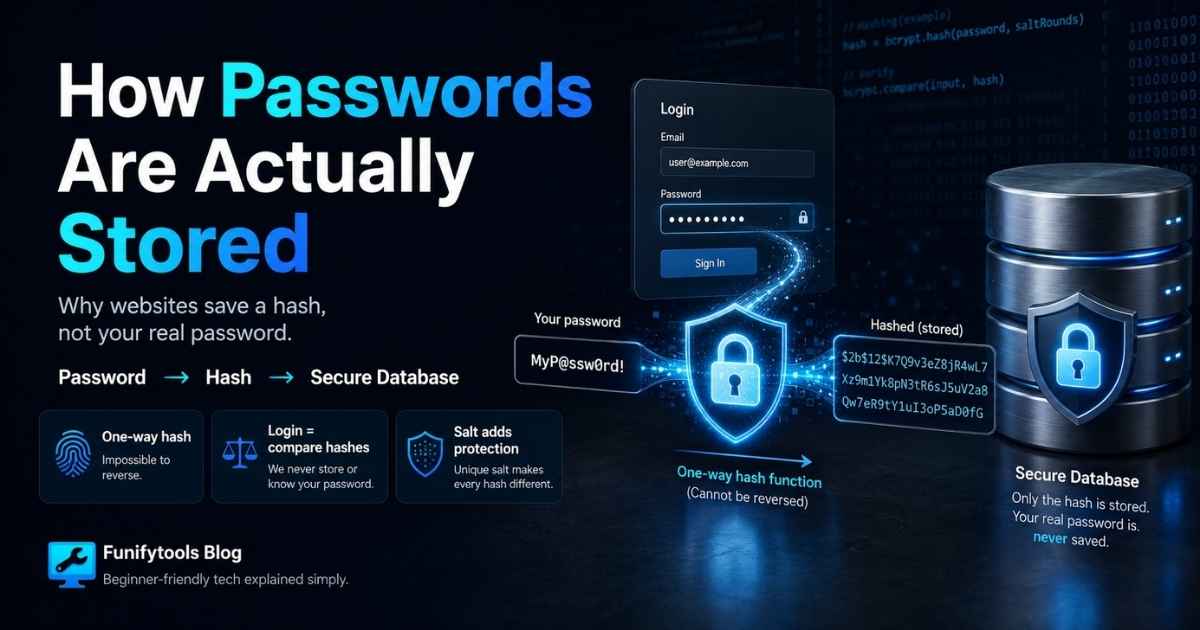
- Good websites do not store your real password as plain text.
- Instead, they store a hash, which is a one-way fingerprint made from your password.
- When you log in, the site hashes the password you typed and compares it with the saved hash.
- If the two hashes match, the site knows you entered the right password without needing to read the original password.
- A hash should be one-way, meaning it is easy to create but extremely hard to reverse.
- A salt is random extra data added before hashing, so identical passwords do not create identical saved hashes.
- Modern systems use slow password-hashing algorithms such as bcrypt, scrypt, or Argon2 to make mass guessing harder.
- The takeaway: websites should verify passwords, not remember them in a readable form.
How Websites Store Passwords Safely
When you create an account, it may feel like the website simply saves your password somewhere and checks it later. A poorly built system might actually do that, but a responsible website should never store your real password in plain text. If plain-text passwords are leaked, every account is immediately exposed.
Instead, websites use a process called hashing. Hashing takes your password and turns it into a fixed-looking string of characters. The important part is that a hash is designed to work in one direction. It should be easy to turn a password into a hash, but extremely hard to turn the hash back into the original password.
Hashing Is Not the Same as Encryption
People often say passwords are encrypted, but for password storage, hashing is usually the more accurate word. Encryption is reversible if you have the key. That is useful for private messages or files that need to be decrypted later. Password verification is different. The server does not need to recover your password. It only needs to check whether the password you typed is correct.
That is why hashing is such a good fit. During sign-up, the website hashes your password and stores the hash. During login, it hashes the password you just typed and compares the new hash with the stored one. If they match, the website lets you in. If they do not match, the login fails.
In a good design, the server never has to display, read, or send your original password back to anyone. It only works with the result of the hash function.
Why a Hash Helps During a Data Leak
If a database leaks and the passwords are stored as plain text, attackers can use them immediately. They can log in to the same site, try the same password on email accounts, or test it across banking, shopping, and social media services.
If the database only contains password hashes, the situation is still serious, but the attacker has more work to do. They cannot simply read the password. They have to guess possible passwords, hash each guess, and check whether the result matches one of the leaked hashes.
This is why weak passwords are still dangerous. If your password is password123, an attacker can guess it quickly. Hashing helps, but it does not magically make a bad password strong.
What a Salt Does
A salt is random data added to a password before hashing. Each user should get a unique salt. This means two people who use the same password should still end up with different stored hashes.
Without salts, attackers can use precomputed tables of common password hashes. These are often called rainbow tables. With proper salts, those tables become much less useful because the same password produces different results depending on the salt.
The salt does not have to be secret. It is often stored next to the hash. Its job is not to hide by itself. Its job is to make every password-hashing result unique and to force attackers to do fresh work for each account.
Why Password Hashing Should Be Slow
For most data, fast hashing is useful. But for passwords, speed can become a problem. Attackers can use powerful hardware to try millions or billions of guesses. If the hash function is too fast, guessing becomes much easier.
That is why modern password systems use algorithms designed to be intentionally expensive. Examples include bcrypt, scrypt, and Argon2. These algorithms slow down each guess and can require more memory or computation, making large-scale attacks harder.
To a normal user, this delay is barely noticeable because logging in once should still be quick. To an attacker trying billions of guesses, the slowdown matters a lot.
What Happens When You Log In
The login flow is simple in concept. You type your password. The server combines it with the stored salt for your account. It runs the same password-hashing algorithm. Then it compares the result with the stored hash.
If the values match, the server knows the password you typed is the same one used when the account was created or last changed. If the values do not match, the server rejects the login. At no point does the server need to store or reveal your original password.
This is also why websites usually cannot tell you your old password when you forget it. A well-built site should not know the old password. It can only let you reset it by proving your identity another way.
Why Reusing Passwords Is Risky
Even with good hashing, password reuse is dangerous. If one website is poorly built or gets breached, attackers may try the same email and password combination on other services. This is called credential stuffing.
The safest habit is to use a unique password for every important account. A password manager makes this much easier because you do not have to memorize every password yourself. You only need to protect the password manager with a strong master password and, ideally, two-factor authentication.
Two-factor authentication adds another layer. Even if someone learns your password, they may still need a code, security key, authenticator app, or device approval before they can log in.
The Simple Version to Remember
A good website should not remember your password in a readable form. It should store a salted, slow hash. When you log in, it hashes what you typed and compares the result with the stored value.
That design protects users because a database leak does not instantly reveal every password. It is not perfect, and weak passwords can still be guessed, but hashing, salting, and slow password algorithms are the foundation of modern password storage.
Want to try hashing and encryption yourself? Open the Funifytools cryptography tools.
This article is also available in Korean: Read the Korean version