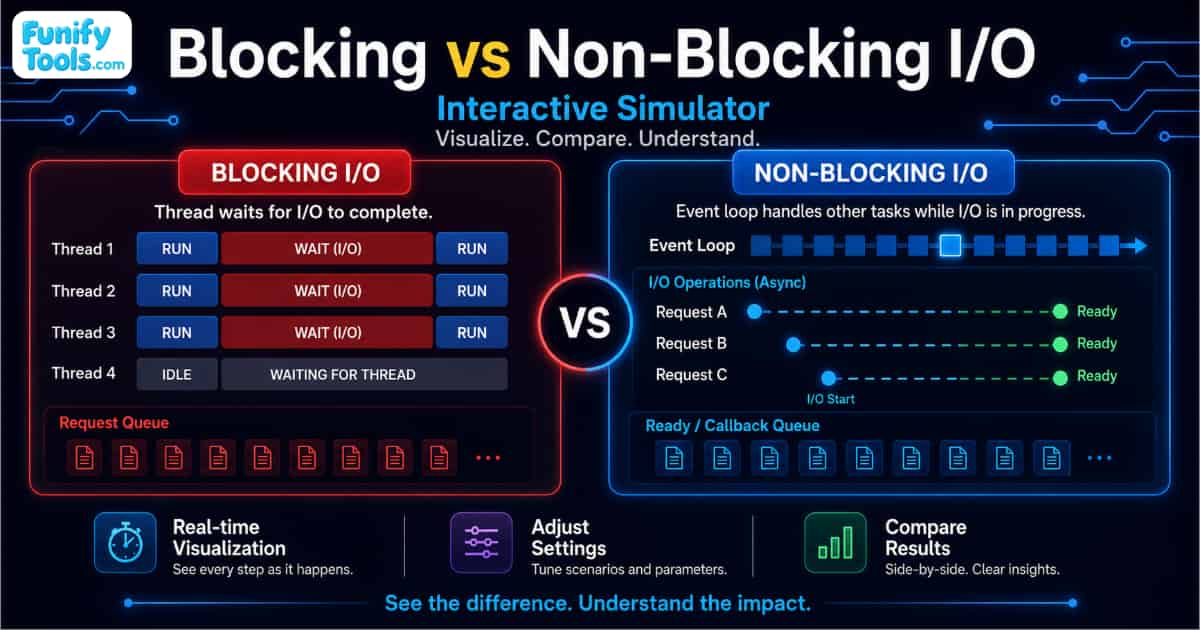
Starting today, I'm going to organize and explain some fundamental computer science concepts one by one. For the first topic, I'd like to begin with the concepts of Blocking I/O and Non-Blocking I/O, and look at how they differ.
I/O, or Input/Output, is generally much slower than CPU processing, so the way a system handles I/O waiting time can have a significant impact on performance and concurrency. Depending on whether the calling process or thread has to wait for the I/O operation to complete, I/O processing can be broadly divided into Blocking I/O and Non-Blocking I/O.
What Is I/O?
I/O (Input/Output) refers to the way a program exchanges data with external devices or resources such as storage devices, networks, keyboards, and mice.
Common I/O operations include reading and writing files, accessing disks, and sending or receiving data over a network. Because these operations generally take much longer than CPU calculations, a program may spend time waiting for an I/O operation to complete. This is commonly referred to as I/O wait.
In simple terms, Blocking I/O makes the calling process or thread wait until the I/O operation is complete, while Non-Blocking I/O returns control immediately even when the operation cannot be completed right away, allowing the program to perform other work in the meantime.
How Blocking I/O and Non-Blocking I/O Work
Blocking I/O
With Blocking I/O, when an application calls a system call such as read() or recv() and the requested data is not yet available, the calling thread enters a Blocked or Waiting state until the data becomes ready.
Once the data is available, the kernel copies it from kernel space to user space. The system call then returns, and the application continues executing.
※ The calling thread remains waiting until the I/O operation is completed.
The biggest advantage of this approach is simplicity. The program flow is straightforward and relatively easy to understand.
However, while the I/O operation is in progress, the blocked thread cannot be used to perform other work. This can become inefficient when a system needs to handle a large number of concurrent requests.
Non-Blocking I/O
With Non-Blocking I/O, the calling thread does not wait even if the requested I/O operation cannot be completed immediately.
For example, if an application attempts to read from a socket but no data is currently available, the operation may return immediately with a status such as EAGAIN or EWOULDBLOCK.
The application can then continue performing other work and check the I/O operation again later.
Because a thread does not have to remain blocked while waiting for data, a single thread can potentially manage multiple I/O operations. This makes Non-Blocking I/O particularly useful in systems that require high concurrency.
Blocking I/O vs. Non-Blocking I/O
| Category | Blocking I/O | Non-Blocking I/O |
|---|---|---|
| Basic concept | Caller waits until I/O completes | Control returns immediately |
| Thread state | Blocked / Waiting | Can continue running |
| Return timing | Returns after I/O completion | Returns immediately |
| Implementation | Relatively simple | More complex |
| Resource utilization | Relatively low under high concurrency | More efficient |
| Number of threads | May increase as concurrent requests grow | Can handle many requests with fewer threads |
| Context switching | May increase | Can be reduced |
| Concurrency | Relatively low | High |
| Scalability | Limited in large-scale environments | Suitable for large-scale concurrent processing |
| Typical use | Simple file processing, basic clients | Web servers, network servers |
| Related technologies | Thread-per-Request |
select, poll, epoll, Event Loop
|
Non-Blocking I/O and I/O Multiplexing
One issue with a simple Non-Blocking I/O implementation is that an application may repeatedly check multiple sockets to see whether data has arrived.
If it keeps checking continuously, this may result in Busy Waiting, which can waste CPU resources.
To avoid this problem, real-world systems commonly combine Non-Blocking I/O with I/O Multiplexing technologies such as select, poll, and epoll.
What Is Busy Waiting?
Busy Waiting is a technique in which a process or thread continuously checks whether a condition has been satisfied instead of entering a sleeping or waiting state.
For example, if an application repeatedly checks whether data has arrived on a socket even when there is nothing to process, the CPU continues performing unnecessary work.
In other words, the program is technically “waiting,” but instead of resting while it waits, it keeps checking the same condition over and over again.
I/O Multiplexing allows a single thread to monitor multiple I/O objects and process only those that are actually ready.
This reduces unnecessary polling and makes it possible to handle many connections more efficiently. Technologies such as Linux epoll and BSD/macOS kqueue are widely used in high-concurrency network servers for this reason.
Blocking/Non-Blocking vs. Synchronous/Asynchronous
One point that can be confusing is the relationship between Blocking/Non-Blocking and Synchronous/Asynchronous.
Although these concepts are often mentioned together, they describe different aspects of I/O processing and should not be treated as the same thing.
| Concept | Meaning |
|---|---|
| Blocking | The caller waits until the result is ready |
| Non-Blocking | The call returns immediately regardless of whether the result is ready |
| Synchronous | The caller checks or waits for the I/O operation to complete |
| Asynchronous | The system notifies the caller when the I/O operation has completed |
Therefore, Non-Blocking I/O does not necessarily mean Asynchronous I/O.
For example, if an application repeatedly calls read() in Non-Blocking mode to check whether data is available, the operation is Non-Blocking, but the application is still directly checking the completion state itself.
In that sense, the processing can still be considered synchronous.
Where Each Approach Is Used
Blocking I/O is simple to implement and provides a clear control flow. However, in environments with many simultaneous requests, a large number of blocked threads can increase memory usage and Context Switching overhead.
For this reason, Blocking I/O is generally well suited to relatively simple workloads, such as file processing, batch programs, or client/server applications where very high concurrency is not required.
Non-Blocking I/O, on the other hand, immediately returns control to the caller and allows the application to perform other work while waiting for I/O.
When combined with technologies such as select, poll, epoll, I/O Multiplexing, and Event Loops, it becomes possible to handle a large number of simultaneous connections with relatively few threads.
This makes Non-Blocking I/O particularly suitable for systems such as Web Servers, API Servers, Chat Servers, Proxies, and Gateways, where many clients may need to be handled at the same time.
That said, Non-Blocking architectures are not automatically better in every situation. They often require more complicated state management, event handling, and error handling.
For that reason, the appropriate I/O model should be chosen based on the scale of concurrent connections, workload characteristics, and overall system architecture.
In general, Blocking I/O is a good fit when simplicity and sequential processing are more important, while Non-Blocking I/O is better suited to large-scale systems where concurrency and scalability are key requirements.
Try It with an Interactive Simulation
Blocking I/O and Non-Blocking I/O can feel somewhat abstract when explained only in text.
It becomes much easier to understand the difference when you can actually observe how a thread behaves after an I/O request, when it waits, and when it is able to continue doing other work.
The Blocking vs. Non-Blocking I/O Simulator on Funifytools lets you compare the two approaches step by step and see how their execution flows differ.
If you would like to explore the concepts visually, you can try the simulator here:
▶ Blocking vs. Non-Blocking I/O Simulator
https://funifytools.com/IT-Concepts/Systems-and-OS/blocking-nonblocking-io-simulator
Thank you for reading. I hope this helped make the difference between Blocking I/O and Non-Blocking I/O a little clearer.
This article is also available in Korean: Read the Korean version